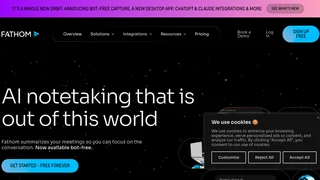
Fathom is an AI meeting notetaker that automatically records, transcribes, and summarizes conversations across video conferencing platforms. Instead of splitting attention between listening and typing, participants join meetings normally while Fathom captures everything in the background without appearing as a visible bot. The product generates instant post-meeting summaries, extracts action items, and syncs key data to CRM and project management tools. Fathom serves over 300,000 companies and supports use cases across sales coaching, customer success monitoring, marketing feedback collection, and operations coordination.
Key Features
- Auto-generated summaries delivered within minutes of a meeting ending, highlighting decisions, topics, and next steps without requiring manual review.
- Searchable transcripts with speaker labels and timestamps, making it possible to locate specific moments or quotes across months of recorded conversations.
- Action item extraction that identifies tasks, owners, and deadlines from conversation context and surfaces them in a structured task list.
- Ask Fathom is a natural language query tool that lets users search past meetings by asking questions like "what did the client say about pricing last quarter."
- AI Scorecards provide coaching metrics for sales managers, tracking talk-to-listen ratios, monologue length, and question frequency across team calls.
- CRM auto-updates push call summaries, action items, and key moments directly to Salesforce or HubSpot without manual data entry.
- Bot-free capture means Fathom joins meetings silently without displaying an AI participant in the attendee list.
- Key moment monitoring alerts users when specific topics, competitor names, or risk signals are mentioned during calls.
How It Works
Fathom connects to a user's calendar and conferencing platform during setup. When a scheduled meeting begins, it joins the call silently in the background, records the audio, and transcribes speech in real time. Its AI models process the conversation to identify action items, decisions, questions, and notable moments as they occur. Within a few minutes of the meeting ending, a structured summary appears in the user's Fathom dashboard and can be automatically shared to Slack, Notion, or a connected CRM. Users can revisit any past meeting through the searchable archive and query specific details using the Ask Fathom natural language interface.
Integrations
Fathom supports meeting capture on Google Meet, Zoom, and Microsoft Teams. After meetings conclude, summaries and action items can be routed to several destination tools:
- Salesforce and HubSpot for CRM activity logging
- Slack for team notifications and searchable message threads
- Notion and Asana for project and task management
- Zapier for custom workflow automation across hundreds of apps
- ChatGPT and Claude for querying meeting data inside AI assistants
- A public API and MCP endpoint for custom integrations and developer access
Pricing and Plans
Fathom offers four tiers. The Free plan includes unlimited recordings and transcriptions, instant AI call summaries, clips and playlists, and search across calls at no cost. The Premium plan at $20 per month ($16 billed annually) adds 15+ advanced summary templates including BANT and Sandler, AI-generated action items, a conversational meeting assistant, custom meeting bot, coaching metrics, and AI follow-up emails. The Team plan at $19 per user per month ($15 billed annually, 2-user minimum) adds global search across shared calls, collaboration via comments and folders, customized transcription vocabulary, SSO, and keyword alerts. The Business plan at $34 per user per month ($25 billed annually) adds full CRM field sync, Deal View for summarizing insights, AI scorecards, custom data retention policies, and professional services. All paid plans include a 90-day guarantee. Fathom also offers up to 2 years free for qualified VC-backed startups and 10 free seats for nonprofits.
Privacy and Security
Fathom holds SOC 2 Type II certification and is both GDPR and HIPAA compliant. The platform supports SSO and SCIM for enterprise identity management. Meeting data is encrypted in transit and at rest, and the bot-free capture design means the tool does not appear as a participant, which can reduce privacy concerns from external attendees. Users retain control over which meetings are recorded and how long data is retained.
Pros and Cons
Pros
- A free forever tier is available with no trial expiration, making it accessible for individual users and small teams to evaluate without commitment.
- Bot-free capture keeps meetings feeling natural and unobtrusive for all participants, including external guests.
- CRM auto-sync eliminates manual activity logging for sales reps, reducing administrative overhead after each call.
- The Ask Fathom query tool makes large archives of past meetings searchable by meaning rather than requiring manual transcript scanning.
- AI Scorecards provide objective coaching data for sales managers without requiring call shadowing.
Cons
- Advanced features like Scorecards, team analytics, and cross-meeting pattern detection are likely restricted to paid team plans, limiting the free tier for organizational use.
- Reliance on scheduled calendar meetings means ad-hoc phone calls and in-person conversations fall outside the capture workflow.
- AI transcription accuracy can degrade with heavy accents, poor audio quality, or domain-specific technical vocabulary.
- Teams already using a suite of communication and analytics tools may face subscription overlap and integration complexity.
Who Should Use Fathom
Fathom is suited for sales representatives who need CRM activity logs without manual data entry after every call, and for customer success managers who track sentiment trends and risk signals across client accounts. Team leads and sales managers benefit from AI Scorecards that surface coaching opportunities from real call data rather than scheduled ride-alongs. Knowledge workers in marketing, operations, and product roles can also use Fathom to maintain searchable meeting archives and track action items that span multiple projects and teams.