Categories
Overview
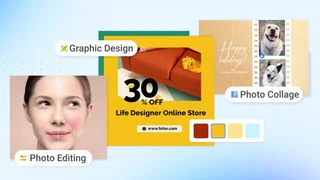
Fotor is an online photo editor and design platform that combines traditional editing tools with AI-powered enhancement, generation, and batch workflows. It targets content creators, e-commerce sellers, marketers, and casual users who want Photoshop-style results without a steep learning curve. Fotor runs in the browser and also offers desktop and mobile apps, with projects syncing across devices under one account.
Key Features
- AI photo editor with 30+ tools: One-click enhancement, background removal, object removal, portrait retouching, color correction, photo restoration, and AI image extension are available in a single workspace, reducing the need to switch between separate apps.
- Prompt-based editing: Users can describe edits in natural language, such as changing backgrounds, adjusting lighting, or extending image borders, and Fotor applies the changes automatically through its AI Agent workflow.
- Text-to-image generation: The AI image generator supports models including Nano Banana, FLUX, Seedream, Qwen, and others, letting users create photos, illustrations, and marketing visuals from text prompts.
- Batch photo editing: The batch editor accepts up to 50 images at once for operations like enhancement, background removal, and skin retouching, which helps e-commerce and social teams process large sets faster.
- Design and collage tools: Beyond photo edits, Fotor includes templates, stickers, fonts, effects, and collage layouts for social posts, ads, and presentations.
- AI avatars and headshots: Selfie uploads can be turned into professional headshots or stylized avatars for LinkedIn, resumes, and social profile pictures.
- Cross-platform access: Fotor works on Windows, Mac, iOS, and Android, so edits started on desktop can continue on mobile through account sync.
Generation Quality and Editing Control
Fotor integrates multiple third-party image and video models under one subscription, including GPT Image, Nano Banana, Seedream, FLUX, Midjourney v7, Kling, Veo, Sora, and Wan variants listed on its pricing page. Image enhancement can upscale resolution up to 4K, and background removal handles complex edges such as hair. Users can choose no-image generation, image placeholders, or full AI visuals when starting projects. Advanced edits like magic eraser, AI background replacement, and batch processing are tied to paid plans or credits rather than the full free tier.
Pricing and Plans
Fotor uses a credit-based subscription model with three main tiers. Fotor Basic is free forever and includes limited free credits, one concurrent generation, two AI Agent chats, basic editing tools, 512MB cloud storage, 30-day creation storage, and watermarked JPG, PNG, and PDF exports. Fotor Pro adds a monthly credit allowance, ten concurrent generations, 1,000 AI Agent chats, 100+ editing tools, premium templates and effects, exclusive AI model access, 2GB cloud storage, unlimited creation storage, and HD watermark-free exports. Fotor Pro+ increases allowances further with 30 concurrent generations, 2,000 AI Agent chats, exclusive batch background tools, multiple brand kits, AI slide generation, 100GB cloud storage, and higher concurrent task limits. Monthly and yearly billing options are available on the pricing page, and unused subscription credits roll over for up to five months while subscribed.
Export Options and Commercial Use
Free users export with watermarks on standard formats. Pro and Pro+ subscribers can export HD JPG, PNG, and PDF files without watermarks, including transparent PNG output. Fotor also sells separate one-time AI headshot packages and API plans for developers who need programmatic access outside the standard editor workflow.
Pros and Cons
Pros:
- Broad toolset covers enhancement, generation, design, and batch editing in one platform.
- Text-prompt editing lowers the skill barrier for users who do not know traditional layer-based editors.
- Free tier allows basic editing and evaluation before upgrading.
- Mobile and desktop apps with sync suit creators who edit on the go.
- Paid plans unlock premium templates, effects, and watermark-free HD exports for client work.
Cons:
- Free plan credits are limited and exports are watermarked, which restricts professional use.
- Advanced AI features and batch tools require Pro or Pro+ subscriptions or extra credits.
- Credit consumption varies by action, so heavy AI generation can burn through monthly allowances quickly.
- Cloud storage on lower tiers is modest compared with dedicated asset management platforms.
Who Should Use Fotor
Fotor fits solo creators, small businesses, and e-commerce sellers who need fast AI photo cleanup, background removal, and social content without learning Photoshop. Marketing teams that want templates, collages, and generative images in one place will also find it practical. It is less ideal for studios that need deep non-destructive RAW workflows, large-team brand governance, or unlimited API volume without monitoring credit costs. Users who only need occasional one-off edits may stay on the free tier, while high-volume catalog and campaign work generally requires Pro or Pro+.
Tool Overview
Pricing
Similar AI Tools
Canva AI
Canva AI is a suite of AI-powered design and creativity tools integrated into the Canva platform. It enables users to generate images, videos, animations, written content, presentations, and complete designs from text prompts. The suite includes Magic Write, Magic Layers, AI Image Generator, AI Video Generator (powered by Google Veo 3), AI Photo Editor, Magic Animate, Magic Resize, Canva Code, AI Voice Generator, AI Music Generator, and an AI Assistant conversational interface. Canva AI 2.0 introduces a conversational creative partner that learns personal style over time, connects to external tools, runs web research, and can schedule recurring design tasks.
X Design
X Design (now Zawa AI) is an AI-powered brand kit generator and product photography tool that helps small businesses, Etsy sellers, and e-commerce merchants create professional logos, social media content, posters, and studio-quality product images without design experience.

PNGFree.ai
PNGFree.ai provides a free AI background remover and millions of transparent PNG images for designers, marketers, and content creators.
AI Image Enlarger
AI Image Enlarger (imglarger) is a browser-based suite of AI photo tools that upscale, enhance, denoise, and retouch images, helping creators, designers, and everyday users produce higher-quality visuals without installing software.
PicLumen AI Image Generator
PicLumen is an all-in-one AI creative platform for generating images and videos from text prompts and reference images.