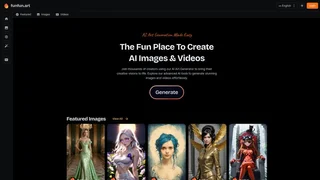
FunFun Art is an AI creative platform built around generating images and videos from the browser. The homepage frames it as the best place to create AI images and videos, with a gallery of community work, featured generations, and direct access to an AI art generator workflow.
The product targets creators who want a social, visual-first experience rather than a bare utility interface. Users can explore featured images and videos, react to community posts, and launch generation flows from the main dashboard. Recent updates include Qwen Image Edit for image editing workflows alongside standard text-to-image and video generation paths.
FunFun Art emphasizes discovery as much as generation. Featured galleries, user profiles, and reaction counts give new visitors concrete examples of what the models can produce, which lowers the trial-and-error cost that often comes with blank-prompt interfaces on other art platforms.
Key Features
- Generate AI images and videos from a unified creative dashboard.
- Use Qwen Image Edit for advanced image editing and img2img workflows.
- Browse featured community images and videos for inspiration.
- Share generations publicly and engage with reactions on community posts.
- Access an AI art generator with pipeline and model selection options.
- Explore galleries organized around images, videos, and user profiles.
- Switch between image and video creation flows from the same account dashboard.
- Study public prompts and reactions to refine your own generation approach.
- Save favorite community posts as references for future prompt and style experiments.
- Iterate on image edits with Qwen Image Edit before publishing final versions publicly.
Use Cases
- Digital artists can experiment with styles and publish work to a built-in community.
- Content creators can produce short AI videos and images for social channels.
- Hobbyists can explore featured work and learn from public generation examples.
- Marketers can quickly prototype visual concepts before committing to a full design pass.
- Educators can demonstrate generative art workflows using community examples in class.
- Fan creators can build themed image sets and short clips around niche communities.
- Indie game developers can prototype character art and environment mood boards quickly.
Intended Users
FunFun Art is aimed at hobbyists, indie creators, and social artists who enjoy public sharing and community feedback. Enterprise brand teams that need strict approval workflows, private model hosting, or detailed rights management will likely want a more controlled production environment.
Community Layer
FunFun Art blends generation with discovery. Featured images and videos sit alongside user profiles and reaction counts, which gives the platform more of a creator-network feel than a standalone generator. That social layer can help new users understand what the models can produce before they write their first prompt. New users can browse trending posts before writing prompts, which shortens the learning curve compared with blank-canvas generators.
Why It Matters
FunFun Art fits creators who want generation and inspiration in the same place. The emphasis on galleries, featured work, and community reactions makes it easier to stay inside one product from idea to output. It is less suited to teams that need strict brand controls or enterprise governance, but for individual creators exploring image and video AI, the platform offers an approachable and visually engaging workflow.
Workflow Notes
Most users begin on the homepage or gallery, pick a generation path for images or videos, and refine results through model and pipeline settings in the art generator. Qwen Image Edit adds a second loop for users who already have a base image and want targeted edits rather than full regeneration. Because public generations and reactions are visible across the community, many creators study featured posts first to understand which prompts and styles produce strong results before investing time in their own runs.