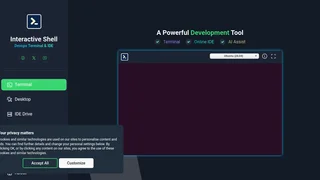
Interactive Shell is a cloud-based collaborative coding platform that provides instant-access web terminals and an AI-powered integrated development environment. It eliminates the need to configure operating systems, virtual machines, or software development kits by offering a ready-to-use online terminal that supports over 50 programming languages. Developers, educators, and students can write, compile, and test code directly in the browser without installing anything locally. The platform combines an xterm-based terminal emulator with AI assistance, persistent sessions, and cloud file storage through its IDE Drive feature, making it suitable for rapid prototyping, coding interviews, classroom exercises, and DevOps training.
Key Features
- Instant browser-based terminal. Access a full Linux or Windows terminal directly in the browser with no setup or configuration required. The xterm-based emulator provides a familiar command-line experience for running scripts, managing files, and testing code.
- AI-powered coding assistant. The built-in AI assistant accepts natural language queries via the
ai command to help debug errors, explain code, suggest improvements, or generate snippets across supported languages. AI assist is available with unlimited usage on paid plans.
- IDE Drive cloud storage. Pro subscribers get 25GB of persistent cloud storage accessible from the terminal. Workspace files are mounted at
/mnt, allowing users to save work across sessions and access it from any device. The free plan includes 1MB of IDE Drive space for lightweight testing.
- Compiler support for 50+ languages. Pre-installed compilers and interpreters include GCC for C and C++, Python 3, Java, Node.js, Ruby, Go, Rust, and many others. Users can immediately run code without managing language toolchains or dependencies.
- Persistent terminal sessions. Premium users maintain persistent sessions with internet access from within the terminal, enabling package installation, API calls, and long-running processes that survive browser disconnections.
- Session recording with asciinema. Terminal sessions can be recorded using the built-in asciinema integration, making it easy to create coding tutorials, document workflows, or share debugging sessions with teammates.
- Collaborative coding environment. Multiple users can work within shared terminal environments, supporting pair programming, code reviews, and instructor-led coding exercises in real time.
Available Languages and Tools
Interactive Shell comes pre-configured with over 50 programming languages including C, C++, Python, Java, JavaScript, TypeScript, Ruby, Go, Rust, PHP, Perl, Lua, R, and many others. The platform uses Judge0 for code execution and evaluation, providing consistent runtime environments for each language. Beyond compilers, users have access to standard Unix tools such as git, curl, wget, vim, nano, and ssh, along with package managers like apt and pip on premium plans where internet access is enabled. Docker underpins the containerized session architecture, ensuring isolation between user environments.
Pricing and Plans
Interactive Shell offers three pricing tiers. The Free plan includes a basic terminal with no internet access, 1MB of IDE Drive storage, and limited AI assist queries. The Monthly plan costs $5 per month and unlocks the full Pro terminal with internet access, 25GB of IDE Drive, and unlimited AI assist. The Lifetime Premium plan is a one-time $19 payment that includes all Pro features plus enrollment in in-house Linux and DevOps training courses. Coupon codes are available for the lifetime plan, and up to three codes can be stacked to increase IDE Drive storage to a maximum of 100GB.
Pros and Cons
Pros:
- Zero-setup development environment accessible from any modern browser, removing the friction of local toolchain configuration.
- Affordable lifetime premium option at $19 provides permanent access to all features including DevOps training courses.
- Broad language support with over 50 pre-installed compilers and interpreters covering most popular programming ecosystems.
- AI assist integrated directly into the terminal workflow via a simple command, rather than requiring a separate interface or extension.
- Session recording with asciinema makes it practical for educational use and knowledge sharing.
Cons:
- The free plan lacks internet access from within the terminal, which prevents installing packages or fetching external dependencies during free-tier sessions.
- IDE Drive storage on the free tier is limited to only 1MB, making it unsuitable for any project beyond trivial single-file scripts.
- AI assist is described as ChatGPT-based with no disclosed model version or context window specifications, leaving capability details unclear.
- Primary purpose stated as educational use, with explicit restrictions against unauthorized activities, which may limit certain testing or security research use cases.
Who Should Use Interactive Shell
Interactive Shell is well-suited for students and educators who need an instant, consistent coding environment for classroom exercises, assignments, and demonstrations without wrestling with local installations across different machines. Developers preparing for technical interviews will find the platform useful for practicing coding problems in multiple languages with a real terminal experience. DevOps beginners can benefit from the included training courses and the ability to practice Linux commands and scripting in a safe, isolated environment. The platform is less suited for teams building large production applications that require complex dependency graphs, local development servers, or integrated debugging tools beyond what a terminal-based workflow can provide.