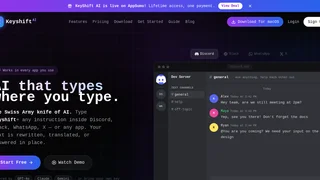
KeyShift AI is a system-wide desktop application designed for Windows and macOS operating systems that brings artificial intelligence capabilities directly into any text input field across your environment. Instead of switching back and forth between web browsers and desktop software to copy, paste, or refine text, KeyShift AI enables users to trigger artificial intelligence directly where they type in software such as Slack, Discord, Microsoft Word, Notion, Gmail, and WhatsApp.
Key Features and Capabilities
KeyShift AI provides multiple flexible trigger options designed to fit diverse typing habits and productivity workflows across desktop software environments.
- Inline Triggering: Type the keyword trigger followed by any natural language instruction directly into a text area and press space twice to rewrite, summarize, or generate text inline.
- Quick Actions Popup: Highlight any text on your desktop and press Ctrl+Shift+A on Windows or Command+Shift+A on macOS to open a quick action floating window for instant grammar fixes, tone adjustments, or translation.
- AI Command Palette: Access a system-wide command palette with Ctrl+K on Windows or Command+K on macOS to query artificial intelligence models for quick answers or custom text transformations.
- Voice Input Processing: Record spoken thoughts using Ctrl+Shift+M on Windows or Command+Shift+M on macOS to automatically transcribe and polish spoken words into clean written prose.
- Clipboard History Intelligence: Press Ctrl+Shift+V on Windows or Command+Shift+V on macOS to view clipboard history and instantly apply artificial intelligence actions to previously copied items.
- Screen Text Extraction: Drag an optical character recognition selection box over any screen area using Ctrl+Shift+O on Windows or Command+Shift+O on macOS to capture and process text from images, PDF documents, or video subtitles.
Supported AI Models and Integration
KeyShift AI connects with leading foundational language models to deliver flexible text generation and context-aware responses across desktop applications.
- Multi-Model Architecture: Access top-tier models including GPT-4o, Claude 3.5, and Gemini for diverse creative writing, coding, and analytical tasks.
- Bring Your Own Key: Users have the option to connect their custom provider API keys directly to reduce costs or maintain direct account control.
- Multi-Step Workflows: Create custom automated multi-step prompt chains for complex repetitive writing and editing tasks across applications.
- Custom Shortcuts and Themes: Customize hotkeys, set specific operational modes, adjust font sizes, and select from six themes including light, sepia, and OLED dark modes.
Use Cases and Practical Applications
KeyShift AI is engineered for software engineers, content creators, customer support representatives, researchers, and business professionals who write digital communication daily.
- Instant Email and Chat Drafting: Refine tone, fix spelling, and adjust clarity in workplace communication tools without interrupting workflow focus.
- Multilingual Team Translation: Translate incoming and outgoing text instantly in real-time messaging apps across global distributed teams.
- Fast Document Summarization: Extract core points and key takeaways from long documents, web pages, and clipboard text rapidly.
- Spoken Note Polishing: Dictate unorganized ideas through voice input and let artificial intelligence structure them into organized bullet points or paragraphs.
Privacy, Security, and Desktop Control
KeyShift AI places strong emphasis on user privacy and system integration control for desktop environments.
- System Tray Customization: Choose whether the application minimizes to the system tray to keep hotkeys active or quits completely upon closing.
- Secure Cloud Synchronization: Synchronize custom settings, shortcuts, and modes seamlessly between desktop installations and web interfaces.
- Data Handling Control: API credentials and local prompt preferences are stored securely using standard operating system credential storage mechanisms.
Pricing and Subscription Plans
KeyShift AI offers structured access plans catering to individual casual users as well as heavy daily power users.
| Plan | Price | Key Features & Usage Limits |
|---|
| Free Plan | $0 / month | 25 free credits per month, access to all desktop triggers and shortcuts |
| Pro Plan | $8 / month | 1,000 monthly credits, custom operational modes, priority support |
| BYOK Option | Usage-based | Connect custom OpenAI, Anthropic, or Google API keys directly |