Categories
Overview
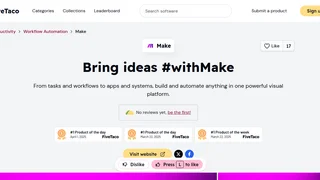
Make is a visual automation platform that enables users to connect applications, data sources, and AI models to build automated workflows without writing code. Formerly known as Integromat and now part of Celonis, Inc., the platform serves over 3,000 pre-built app integrations and supports organizations ranging from individual freelancers to enterprise teams. Its drag-and-drop interface lets users map out multi-step processes called scenarios, with the ability to incorporate conditional logic, data transformations, and AI-powered decision making. The platform covers use cases across marketing, sales, operations, finance, IT, customer experience, and human resources.
Key Features
- Visual workflow builder: A drag-and-drop interface for designing multi-step automation scenarios. Users can connect apps, define triggers and actions, and watch data flow through each step in real time.
- 3,000+ app integrations: Pre-built connectors for popular tools including OpenAI, HubSpot, Salesforce, Slack, monday.com, Canva, NetSuite, Perplexity AI, and DeepSeek AI. Custom apps can also be created for proprietary systems.
- AI agents and AI toolkit: Build and deploy AI agents that orchestrate complex workflows across connected apps. Users can use the built-in AI provider or bring their own LLM API keys (OpenAI, Claude, Gemini) starting from the Pro plan.
- Routers, iterators, and filters: Control flow logic within scenarios. Routers split workflows into multiple branches, iterators process arrays of data, and filters ensure actions only run when conditions are met.
- HTTP and webhook modules: Connect to any public API using the native HTTP module, or trigger scenarios in real time with incoming webhooks.
- Team collaboration and governance: Share scenarios, templates, and connections across users with granular role-based permissions. Enterprise plans add SSO, audit logs, and domain-level access controls.
How It Works
Make operates on a scenario-based model. Each scenario starts with a trigger that watches for an event in a connected app, such as a form submission, incoming email, or webhook call. The scenario then runs action modules that process and route data across apps. Users configure each module by mapping data fields from previous steps, adding filters for conditional logic, and using routers and iterators for branching and looping. Scenarios can be scheduled at intervals as low as one minute on paid plans or triggered in real time. Completed scenarios publish at the click of a button with no server setup required.
Integrations
Make supports over 3,000 standard app connectors spanning CRM, email marketing, project management, e-commerce, social media, AI, and cloud storage. Notable integrations include OpenAI, HubSpot CRM, Salesforce, Slack, Google Workspace, Microsoft 365, Shopify, WordPress, Airtable, Notion, and Stripe. For apps without pre-built connectors, the platform provides HTTP and JSON modules that can interact with any REST API. Users can also build custom app connectors for internal use. Enterprise plans include an on-premises agent for connecting to local network services like SAP.
Use Cases
Marketing teams automate lead capture from web forms into CRM systems, sync email subscriber lists, and schedule social media posts across platforms. Sales teams set up lead routing workflows that assign prospects to representatives and notify them in Slack. Operations teams synchronize data between project management tools and databases, update spreadsheets automatically, and manage approval chains. Finance departments automate invoice processing, expense tracking, and report generation by connecting accounting software with notification tools. HR teams streamline onboarding by coordinating task creation, account provisioning, and document collection across multiple systems. IT teams use Make for monitoring, incident response, and automated ticket routing.
Pricing and Plans
Make offers a Free tier with 1,000 monthly credits and 2 active scenarios. Core at $9 per month adds unlimited scenarios and API access. Pro at $16 adds priority execution. Teams at $29 adds team roles and shared templates. Enterprise plans offer custom pricing with SSO and audit logs.
Privacy and Security
Make maintains GDPR compliance and holds SOC 2 Type II and SOC 3 certifications. All data is encrypted in transit and at rest. The platform supports two-factor authentication with enforcement options for organizations. Enterprise plans include SAML2 and OAuth2 based single sign-on, domain claim for enforcing SSO under verified domains, and audit logs of user actions. Hosting runs on AWS with options for EU or North America data regions. The company maintains a public bug bounty program and publishes ethics and compliance documentation.
Pros and Cons
Pros
- Free plan with no time limit and no credit card requirement, making it easy to evaluate the platform before committing.
- The visual scenario builder provides a clear, branching view of complex workflows that is easier to follow than linear list-based alternatives.
- Deep data manipulation capabilities including routers, iterators, custom JavaScript/Python, and native JSON handling support sophisticated automations.
- Generous app library of 3,000+ connectors plus HTTP/webhook modules covers most integration needs without custom development.
Cons
- The credit-based pricing model can become unpredictable as workflows scale in steps, frequency, or data volume. Multi-step scenarios with loops consume credits rapidly.
- The learning curve for advanced features such as custom functions, JSON parsing, and complex branching logic can be steep for non-technical users.
- No phone support on lower-tier plans; access to dedicated support consultants is reserved for Enterprise customers.
Who Should Use Make
Make is a practical choice for small to medium businesses and departments within larger organizations that need to connect multiple SaaS tools without dedicating engineering resources to custom integrations. It fits teams running marketing campaigns, sales operations, finance reporting, HR onboarding, or customer support workflows where data needs to flow between several apps on a regular schedule or in response to real-time events.
Solo entrepreneurs and freelancers can start with the free plan to automate routine tasks and learn the platform, then upgrade as their workflow volume grows. Enterprise teams with security and governance requirements benefit from SSO, audit logging, and on-premises agent capabilities, though they should evaluate credit costs carefully against anticipated automation volume.
Tool Overview
Pricing
Similar AI Tools

Heffl
Heffl is an all-in-one business management platform for service teams that combines CRM, projects, quotes, invoices, payments, WhatsApp, and AI-assisted workflows.
SalesBlink
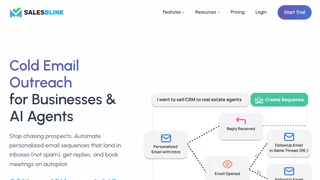
SalesBlink is an AI cold email outreach platform that helps sales teams find leads, write sequences, automate follow-ups, and book meetings.
Trava Trade Compliance
Trava is an AI-powered customs compliance platform that audits import entries and product classifications to help US importers recover overpaid duties and reduce filing risk.
Automix
AI-powered career development platform offering resume review, mock interviews, recruiter tools, and AI chat to automate and enhance the job search workflow.
TeamPal
No-code AI workforce platform for building, customizing, and deploying AI agents across marketing, sales, HR, operations, finance, R&D, design, and IT departments.