
Categories
Overview
Merlin AI is a browser and web app assistant for students, marketers, developers, and consultants who want one subscription for ChatGPT-class models, research tools, writing helpers, and Chrome extension workflows across everyday websites.
How It Works
Merlin runs as a Chrome extension, mobile app, and web chat platform. Users summon the assistant with Ctrl or Cmd+M on any site, or open dedicated tools for chat, projects, crafts, and image generation. Merlin routes prompts to models such as GPT, Claude, Gemini, DeepSeek, Mistral, and Llama without requiring separate accounts for each provider.
Chrome Extension Features
- Summarize webpages, blogs, and YouTube videos with timestamped highlights
- Compose and reply in Gmail, LinkedIn, and X from page context
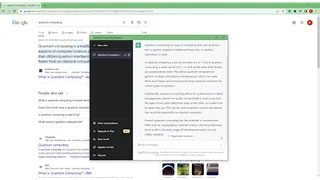
- Search companion for Google and other engines with condensed answers
- Upload PDFs and documents for question answering while browsing
- Generate social posts, emails, and comments without leaving the current tab
Merlin Chat and Projects
The web app adds Projects for reusable knowledge bases, Crafts for diagrams and app snippets, Analyst Mode for spreadsheet analysis, and live search for research with current web sources. Users can maintain context across files, links, and Drive content for tailored responses on recurring work.
Model and Tool Access
Merlin Pro advertises access to premium text, image, and video models under fair-use limits, including high-reasoning models and image generators such as Flux, Ideogram, Recraft, and GPT Image. Free users receive daily query credits to test the platform before upgrading.
Use Cases
- Students summarizing lectures, PDFs, and long videos for study notes
- Marketers repurposing research into SEO posts, outreach emails, and social copy
- Developers prototyping React components and debugging with page context
- Consultants building research reports, diagrams, and client-ready visuals
- Founders drafting outreach, brainstorming with mindmaps, and managing inbox replies
Plans and Pricing
Merlin offers a free plan with limited model access and daily queries. Pro is $19 per month billed annually and includes expanded usage on premium models, advanced image and video generation, unlimited fair access to many extension tools, and priority support. Teams starts at $15 per seat per month billed annually with member management, larger context windows, and usage dashboards.
Security and Privacy
Merlin states that user browsing actions are not tracked except when users explicitly submit a request, and highlights GDPR, SOC 2, and ISO 27001 compliance for teams evaluating data handling.
Why Users Choose Merlin
Merlin positions itself as a lower-cost alternative to stacking separate ChatGPT, Claude, Gemini, and image subscriptions. For freelancers and small teams, one Pro plan can cover research, writing, summarization, and light image generation that would otherwise require multiple monthly bills.
Mobile and Cross-Device Sync
Merlin offers iOS and Android apps with synced history, custom prompts, and chatbot access across devices. That makes it practical for consultants and students who start research on desktop and continue on mobile during commutes or client meetings.
Community and Support
Merlin maintains community forums, a public feedback board, and email support channels where users request features and report issues. Pro subscribers receive faster support response times according to the pricing page.
Research and Writing Loop
Merlin is especially effective when research and writing happen in the same tab: summarize a source, ask follow-up questions, then draft an email or report without copying text between apps. Consultants and students benefit most from that reduced context switching.
Global Availability
Merlin advertises availability in more than 200 countries, including regions where some standalone AI subscriptions are harder to access. That makes it a practical option for multilingual users who also need translation-capable models in daily browsing workflows.
Limitations
Pro usage is subject to fair-use limits across features, so heavy image, video, or premium model consumption may require top-up credits. Merlin is strongest for individuals and small teams rather than enterprises needing private model hosting or fully unlimited API throughput.
Tool Overview
Pricing
Similar AI Tools

Voila
Voila is an AI assistant browser extension and desktop app for writing, research, email replies, summarization, and document chat across the web.

Jasper Everywhere Extension
Jasper Everywhere is a Chrome extension that brings Jasper's AI writing capabilities into Gmail, Google Docs, Canva, WordPress, and Webflow, letting marketers and content creators generate and edit content without leaving the tools they already use.

윌리ai 이메일 어시스턴트
A ChatGPT-powered Chrome extension that generates professional emails in 12 languages from Korean input, enabling native-level business communication in seconds.
ChatGPT Assistant - Use AI Everywhere
Open-source Chrome extension that integrates ChatGPT into search engines, email platforms, and any website through a popup interface, omnibar, and right-click context menu.

DeftGPT
DeftGPT is a Chrome-integrated AI writing companion that helps users generate content, chat with documents, and get search-side answers across Gmail, LinkedIn, and the web.