Phrasly is an AI writing platform from PHRASLY LLC that helps users rewrite, humanize, and check text through phrasly.ai and browser tools such as the Phrasly Human Auto Typer Chrome extension. It targets students, content writers, and professionals who want grammar cleanup, paraphrasing support, and workflows that make AI-assisted drafts read more naturally in everyday editors.
Key Features
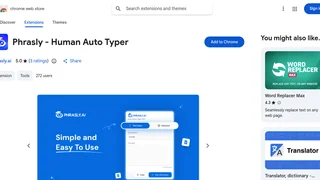
- Human Auto Typer extension inserts text into web forms with human-paced timing, adjustable speed presets, and natural variation instead of instant paste behavior.
- AI rewriting and humanization reframes AI-generated drafts so they read less mechanical before submission or publication.
- Grammar checking flags and corrects language issues in rewritten output.
- Content summarization condenses long passages while keeping core points intact.
- Multilingual support handles multiple languages for rewriting and editing tasks.
- Detector-oriented workflows focus on producing text that performs better against common AI detection checks used in academic and editorial settings.
How Phrasly Works
Users can work in the Phrasly web app for rewriting, grammar, and summarization tasks, or install the Chrome extension when they need typed insertion inside LMS pages, docs, and other browser text fields. The extension simulates keystrokes at a chosen pace so pasted content appears closer to manual typing. Teams typically draft in their preferred AI tool, run the result through Phrasly for cleanup or humanization, then paste or auto-type the final version into the destination editor.
Browser Extension Workflow
The Phrasly Human Auto Typer extension is published in the Chrome Web Store by PHRASLY LLC and works across most web text inputs. Users configure speed and style presets, load the prepared content, and let the extension type into the active field. The lightweight interface is designed for quick setup without a separate desktop client.
Privacy and Data Handling
The Chrome extension developer disclosure states that user data is not sold to third parties, not used for unrelated purposes, and not used for creditworthiness decisions. Support is available through phrasly.ai, and the developer lists a published privacy policy on the official site.
Pros and Cons
Pros:
- Combines web rewriting tools with a browser utility for realistic typing behavior.
- Speed and style controls make the extension adaptable to different form lengths and editors.
- Grammar and summarization features reduce extra cleanup steps after paraphrasing.
- Multilingual support broadens use beyond English-only workflows.
Cons:
- Public pricing pages were not accessible during review, so plan limits must be confirmed inside the product before purchase.
- The Auto Typer extension focuses on insertion mechanics and may not replace full desktop writing suites.
- Detector-oriented positioning can encourage misuse in academic integrity contexts if policies prohibit AI assistance.
- Chrome-only extension support leaves Firefox and Safari users on the web app alone.
Use Cases
Freelance writers use Phrasly to smooth client-facing drafts after an initial AI outline. Students may use the grammar and summarization utilities for study notes, but should follow school policies on AI assistance before submitting graded work. Operations teams that paste long templates into browser-only admin panels can use the Auto Typer extension when a form rejects bulk paste actions or flags instant insertion as non-human input.
Limitations
Phrasly is not a full collaborative editor like Google Docs or Notion, and it does not manage bibliographies or citation styles for academic publishing. Humanization features cannot guarantee outcomes on every detector, and quality still depends on the underlying draft. Teams needing audit logs, SSO, and role-based content approval should evaluate enterprise writing platforms instead. The Auto Typer also depends on the destination site allowing scripted keyboard input, which some secure portals block by design.
Who Should Use Phrasly
Phrasly suits writers who already produce drafts with AI assistance and need a dedicated cleanup, paraphrase, and insertion layer before publishing. It is less appropriate for teams that require enterprise document governance, collaborative editing, or verified citation workflows inside a single platform. Students and freelancers should confirm institutional rules before relying on humanization or detector-focused features.