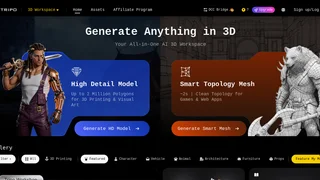
Tripo Studio is an all-in-one AI 3D workspace from Tripo AI that turns text prompts and reference images into textured, riggable 3D assets inside a browser-based editor. It is built for game developers, 3D printing hobbyists, product designers, and digital artists who need fast concept-to-asset workflows without assembling separate generation, retopology, texturing, and rigging tools.
Unlike single-step generators that stop at a raw mesh, Tripo Studio combines generation, segmentation, Smart Mesh retopology, AI texturing, and auto-rigging in one pipeline aimed at production-ready exports.
Key Features
- Text and image to 3D generation: Users describe objects in plain language or upload JPG, PNG, or WEBP images (up to 5 MB) to produce 3D models with shape and surface detail.
- High-detail and Smart Mesh outputs: High-detail generation supports up to 2 million polygons for 3D printing and visual art, while Smart Topology Mesh produces clean topology in about 2 seconds for games and web apps.
- Intelligent segmentation: Complex models can be split into structured, editable parts with clean edges, so artists adjust components instead of rebuilding entire assets.
- AI texturing with Magic Brush: One-click texturing applies 4K PBR-ready surfaces, and Magic Brush supports local repaint for precise detail control.
- Auto rigging and animation: Static meshes can be rigged with skeletons and skin weights, then animated with export-ready motion files.
- Batch generation and multi-view input: Paid plans add multi-view to 3D, part-based generation, and batch jobs (up to 10 models on Pro or 30 on Max and Team).
- Community gallery: A public gallery showcases creations across characters, vehicles, architecture, props, and more, while paid tiers expand private storage and download limits.
How Tripo Studio Works
The workflow starts with a prompt or image upload. For text-to-3D, Tripo generates a reference image from the description, then converts it into a 3D mesh once confirmed. Image-to-3D reconstructs geometry directly from the uploaded reference.
After the base model is created, users can enhance it through segmentation, Smart Mesh retopology, texturing, rigging, or animation before exporting. Teams can produce quick blockouts for review, then spend credits on refinement only for assets that move forward.
Asset Types and Export Formats
Tripo Studio covers characters, vehicles, animals, architecture, furniture, props, weapons, and other asset types visible in its public gallery. The platform emphasizes pipeline-ready geometry with organized meshes and solid topology.
Models download in STL, OBJ, and FBX formats for game engines, DCC tools, and 3D printing slicers. Free-tier outputs use CC BY 4.0 licensing, while Pro, Max, and Team plans unlock private models and commercial use rights.
Editing, Rigging, and Integrations
Segmentation separates logical parts such as limbs or mechanical components. Smart Mesh targets game-ready topology with fast processing, which helps web viewers and real-time engines that penalize dense geometry.
The rigging pipeline builds skeletons and skin weights, then supports animation presets for downstream tools. Tripo also documents a Blender plugin and MCP server integration for connecting Studio generation to desktop editing environments.
Pricing and Plans
Tripo Studio uses a credit-based subscription model. The Free plan costs $0 per month with 200 credits (up to 8 models), one concurrent task, standard queue priority, a one-day Smart Mesh trial, public CC BY 4.0 models, storage for 10 models, and limited downloads.
| Plan | Monthly price | Annual billing | Monthly credits |
|---|
| Free | $0 | N/A | 200 (up to 8 models) |
| Pro | $19.9 | $13.93/mo ($167.16/year) | 3,000 (up to 120 models) |
| Max | $89.9 | $53.94/mo ($647.28/year) | 25,000 (up to 1,000 models) |
| Team | $109.9 per seat | $54.93/mo per seat ($1,978.20/year) | 45,000 (up to 1,800 models) |
Pro adds 10 concurrent tasks, multi-view to 3D, batch export, Smart Mesh, private commercial models, ultra-high mesh quality, and unlimited downloads. Max and Team raise concurrency to 100 and 200 tasks, add dedicated processing, unlimited retries, permanent edit history, and early beta access. Team also includes shared workspace assets and centralized billing.
Pros and Cons
Pros:
- Combines generation, segmentation, retopology, texturing, rigging, and export in one browser workspace.
- Offers both high-polygon detail for printing and fast Smart Mesh output for real-time use cases.
- Published pricing is transparent with clear credit allowances and annual discounts.
- Supports STL, OBJ, and FBX exports plus documented Blender integration.
Cons:
- Free-tier models are public under CC BY 4.0 with download caps, limiting confidential client work without upgrading.
- Multi-view input, batch generation, private commercial licensing, and unlimited retries require paid plans.
- Heavy production on the Free tier is constrained by one concurrent task and standard queue priority.
- Smart Mesh on Free is limited to a one-day trial, so ongoing retopology depends on a paid subscription.
Who Should Use Tripo Studio
Tripo Studio fits indie game teams, 3D printing makers, concept artists, and AR/VR prototypers who need fast mesh drafts from text or photos and want optional refinement in the same tool. It suits creators who value speed over hand-sculpting every asset.
Studios with strict commercial confidentiality or very large offline-only pipelines may need Team capacity or external DCC finishing, but Tripo Studio remains a strong starting point for AI-assisted 3D asset production.