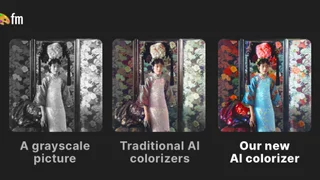
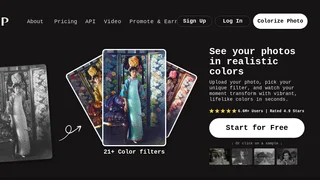
Palette is an AI photo colorization platform that helps photographers, genealogists, and archivists bring black-and-white images back to life with realistic color. Upload a scan or vintage photo, pick from more than 21 color filters, and refine results with keyword-based tuning so skin tones, fabrics, and lighting feel natural instead of flat or oversaturated.
How Colorization Works
The workflow is deliberately simple: upload one or many images, preview unlimited low-resolution colorizations, choose a filter style, and optionally adjust colors with descriptive keywords before exporting. Palette emphasizes accurate skin tones, natural light, and fine details such as hands, lips, and fabric texture, positioning itself as a research-backed alternative to generic brown-and-purple colorizers.
Users can batch upload photos, pin favorite filters, duplicate edits for faster workflows on paid tiers, and download watermark-free files up to 5000 by 5000 pixels when credits are applied.
Key Features
- 21+ AI color filters tuned for portraits, interiors, landscapes, historical scenes, and clothing
- Unlimited free previews at reduced resolution with optional Palette watermark
- Keyword customization to steer color choices after selecting a base filter
- Batch uploads for albums, family archives, and production pipelines
- API and video colorization documentation for developers and studios
- One-time credit packs and subscription plans with rollover credits
Use Cases
- Family historians restoring wedding, military, and immigration photos for albums
- Documentary producers preparing archival stills for broadcast and streaming
- Museums and publishers colorizing heritage collections for exhibitions
- Content creators refreshing vintage imagery for social posts and blogs
Pricing
Palette offers a free tier with one trial credit for a full-resolution, logo-free export plus unlimited watermarked previews capped at 500 by 500 pixels. Subscription plans start at $72 per year for 480 annual credits ($6 per month equivalent), with faster processing, watermark-free previews, and pro organization features. One-time packs start at $49 for 75 credits usable for two years. Each credit colorizes one photo at full resolution without the Palette logo.
Platform Notes
Palette reports more than 6.6 million users and strong ratings from photography educators and restoration communities. The product also exposes an affiliate program and developer API for partners who want to embed colorization into their own tools. For teams handling sensitive archives, reviewing keyword adjustments on a few sample images before bulk export helps keep historical accuracy consistent across a collection.
Because previews are unlimited on the free tier, most users validate filter choices before spending credits on final high-resolution downloads, which makes Palette practical for both hobbyists colorizing a handful of heirlooms and professionals preparing hundreds of production stills.
Restoration Workflow
A practical Palette session starts with scanning negatives or prints at high resolution, then uploading a small test set to compare filters side by side. Portrait-heavy albums often need different filters than landscape travel photos, so teams pin two or three favorites per project type. Keyword tuning works best with concrete descriptors such as navy uniform, olive foliage, or warm afternoon light rather than vague requests.
Documentary editors frequently export both colorized masters and untouched black-and-white references so producers can choose the right aesthetic per scene. API users batch the same filter configuration across folders, which keeps episodic series visually consistent when hundreds of stills must match.
Practical Notes
Teams evaluating this tool should run a two-week pilot on real production work rather than demo content alone. Measure time saved per deliverable, error rates on first drafts, and whether downstream human review shrinks enough to justify subscription cost.
Document preferred settings, templates, and export defaults so contractors and new teammates reproduce results without rediscovering workflows. Revisit vendor pricing annually because clip credits, character limits, and ad seats change frequently in this category.
Keep a rollback path to your previous toolchain until quality and throughput stay stable across multiple projects, especially when client approvals or compliance reviews still require human sign-off on every public deliverable.
Screenshot onboarding checklists and Loom walkthroughs for your own staff so adoption does not depend on one power user remembering every click path, integration toggle, and export setting across busy production weeks.