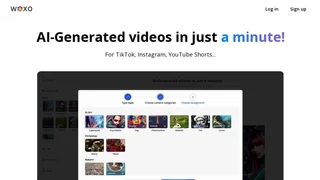
Woxo is an AI video generator that turns a one-line prompt into a publish-ready short-form video. The platform handles the entire production pipeline — script, voiceover, visuals, captions, and publishing — so creators can publish YouTube Shorts and TikTok-style content without filming, recording audio, or using timeline-based editing software. It is aimed at faceless YouTube creators, social media managers, and small content teams that need a steady cadence of short-form videos.
How It Works
Woxo's workflow runs on a single screen. A user types a YouTube video idea into the prompt box, picks a visual style if desired, and the platform generates a complete Short: a script, AI-generated B-roll, a natural-sounding voiceover synced to the visuals, and captions. Once the video is ready, the user can publish or schedule it to YouTube directly from the app. The same idea-to-video flow also supports exporting clips for TikTok and Instagram Reels, and a Zapier integration extends publishing to additional social channels.
Key Capabilities
- AI Script Builder: Enter a one-line idea and Woxo writes a short script optimized for YouTube retention, with hooks, pacing, and narrative structure shaped by what performs well on Shorts.
- Copyright-Free AI Visuals: Every scene is generated by AI models such as Flux.1, not pulled from stock libraries, so videos are original and safe to monetize on YouTube.
- AI Voiceover: Eleven Labs v2.5 voices are synced to the visuals, with multiple natural-sounding voice styles available to match different channels.
- Auto Captions and Subtitles: Captions are generated in multiple languages to improve accessibility and reach.
- One-Click and Scheduled Publishing: A built-in YouTube Scheduler lets users publish immediately or queue videos in advance, with Zapier integration for Instagram and TikTok.
- Batch Creation: Multiple videos can be generated in a single session so a week or more of content can be produced at once.
- SEO Optimization: Titles, descriptions, and tags are generated alongside the video to help it rank in YouTube search.
- In-App Editing: Users can edit scripts, regenerate backgrounds, swap visuals, and tweak voiceover from inside the Woxo editor before publishing.
Intended Users
- Faceless YouTube creators building channels in niches like history documentaries, gaming commentary, fun facts, motivational stories, and "what if" scenarios.
- Content teams managing brand social channels that need a high posting frequency on YouTube Shorts and TikTok without a dedicated video editor.
- Solo creators and small businesses that want a consistent short-form content output without learning traditional editing tools.
Pricing
Woxo offers three plans. The Free plan includes 50 starter credits and script-only mode for testing the tool. The Starter plan starts at $10 per month and adds 500 video credits, Slideshow mode, watermark-free downloads, and the YouTube Scheduler. The Creator plan starts at $20 per month and includes 2,000 credits, access to premium video models (including Seedance 1.0 from ByteDance), Zapier integration, and branding controls. Annual and multi-month plans are available with savings up to 30%, and a 7-day refund policy applies to new users.
Limitations
Woxo is optimized for YouTube Shorts and TikTok-style short-form content. It is not designed for long-form YouTube videos, narrative-driven storytelling with on-camera actors, or projects that need manual color grading and motion-graphic-level polish. The platform also supports a single YouTube channel per account, so users managing multiple channels need separate accounts.