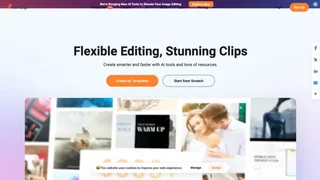
FlexClip is a cloud-based AI video maker and editor for marketers, educators, creators, and small businesses that need polished videos without professional editing software or a steep learning curve.
How It Works
Users start from more than 6,000 editable templates or a blank timeline, then combine clips, text, music, transitions, stock media, and AI-generated elements in the browser. FlexClip supports trimming, merging, speed changes, screen recording, chroma key, GIF creation, and exports up to 4K for sharing on websites and social platforms.
AI Video Tools
- AI Video Generator to create videos from prompts, articles, or URLs
- AI Script for generating narration and storyboard copy
- AI Text to Speech with natural-sounding voiceovers
- AI Auto Subtitle for automatic caption generation
- AI Translator for multilingual video versions
- AI Background Remover for cleaning up footage and still images
- AI Avatar Generator for presenter-style videos without filming
Built-in Resources
FlexClip includes millions of stock videos and photos, thousands of music tracks and sound effects, text presets, dynamic elements, filters, and transitions that can be applied with one click. This reduces the time spent hunting for royalty-free assets across separate marketplaces.
Use Cases
- Marketing teams producing product promos, ads, and social clips
- Educators building lesson explainers and classroom presentations
- Authors and publishers creating book trailers and launch videos
- Real estate and ecommerce sellers showcasing listings and offers
- Agencies collaborating on branded video assets through cloud storage
Collaboration and Sharing
Teams can collaborate in FlexClip, store projects in the cloud, and publish finished videos directly to social channels. The platform is positioned for both solo creators and organizations that need repeatable short-form video production.
Access and Pricing
FlexClip offers a free plan for getting started, with paid subscriptions unlocking longer exports, premium stock, advanced AI usage, and team features. Public schema data lists a free entry tier with optional paid plans for users who need higher output limits and commercial flexibility.
Template Library
FlexClip organizes more than 6,000 templates across business, marketing, ecommerce, education, wedding, sports, and community themes. Recommended collections help beginners start quickly, while category filters make it easier to find formats for product launches, intros, testimonials, and seasonal promotions.
Export and Performance
Finished projects can be exported for web publishing and social distribution, with cloud rendering that avoids installing heavy desktop software. Paid tiers unlock longer videos, higher-resolution output, and premium stock libraries that matter for client-facing marketing work.
Who FlexClip Fits Best
FlexClip is strongest for teams that need frequent short-form video rather than cinematic post-production. Agencies, teachers, ecommerce sellers, and solo creators commonly use it to ship campaigns weekly without hiring a dedicated video editor for every asset.
AI Subtitle Workflow
Auto subtitle generation is especially useful for social clips, training modules, and multilingual campaigns where captions improve accessibility and watch time. Editors can refine timing and wording after the first pass instead of transcribing footage manually.
Stock and Brand Consistency
Because FlexClip includes commercial-use stock and reusable text presets, marketing teams can standardize intros, lower-thirds, and CTA overlays across a quarter of campaigns. That consistency helps small brands look more established on YouTube, LinkedIn, and paid social placements.
Customer Feedback
FlexClip highlights testimonials from designers, educators, authors, and marketers who value the short learning curve and built-in asset library. That feedback reflects the product's focus on speed for everyday business video rather than film-school precision.
Limitations
FlexClip focuses on fast template-driven editing rather than advanced nonlinear post-production. Complex broadcast workflows, granular color grading, and high-end motion design may still require dedicated desktop editors for specialist teams.