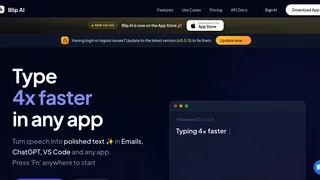
Blip AI is an AI-powered voice dictation tool that converts speech into polished, formatted text across any application on macOS and Windows. Designed for developers, writers, and professionals, it lets users type hands-free by pressing a hotkey and speaking naturally, with automatic punctuation, formatting, and support for over 99 languages. Built by engineers from Microsoft and Amazon under BLIPLABS PRIVATE LIMITED, Blip AI positions itself as a faster alternative to traditional dictation tools like Dragon and Wispr Flow.
Key Features
- Universal App Dictation: Works in any application including VSCode, Cursor, Slack, Gmail, ChatGPT, Windsurf, and Apple Notes. Press the Fn key or a custom shortcut anywhere to start dictating.
- 99+ Language Support: Automatically detects and transcribes speech in more than 99 languages without manual switching.
- AI-Powered Formatting: Goes beyond basic transcription by polishing grammar, applying punctuation automatically, and formatting text to match the context.
- Action Mode: Say "Hey Blip" to trigger hands-free commands such as drafting emails from context or answering questions without touching the keyboard.
- Cross-Device Sync: Synchronizes transcripts between phone and laptop for a continuous workflow across devices.
- API Access: Pro and Team plans include API access, enabling developers to integrate voice transcription into custom applications.
- On-Device Processing Options: Context Awareness features process screen content locally on the device, keeping raw data from reaching external servers.
- Team Collaboration: Team plan includes shared dictionaries, team administration, and analytics for organizational use.
How It Works
Blip AI operates through a simple three-step process. First, the user presses a hotkey (Fn by default, or a custom shortcut) to activate the dictation engine from any application. Second, the user speaks naturally at their preferred speed while Blip AI captures and processes the audio. Third, the tool returns fully formatted and punctuated text directly at the active cursor position. The dictation engine supports long-form speech and adapts to punctuation commands and formatting requests spoken during dictation. On macOS and Windows, the app runs as a background service, listening for the hotkey trigger without interrupting the user's current workflow.
Use Cases
- Software Development: Developers use Blip AI to dictate code comments, documentation, commit messages, and long prompts for AI coding assistants like Cursor and GitHub Copilot.
- Email and Communication: Professionals draft emails in Gmail, Slack messages, and project updates without typing, reducing time spent on daily correspondence.
- Content Creation: Writers and bloggers dictate drafts, outlines, and notes, then refine the AI-polished output for final publication.
- Accessibility: Users with mobility impairments or repetitive strain injuries use voice dictation as a primary input method across all applications.
- Multilingual Work: Teams working across languages use automatic language detection to transcribe meetings, notes, and messages without switching settings.
Integrations
Blip AI does not rely on plugin-based integrations. Instead, it works universally at the operating-system level, inserting text into any active text field regardless of the application. This means it integrates with every desktop application by default, including development environments like VSCode, Cursor, and Windsurf, communication tools like Slack and Gmail, note-taking apps, word processors, and web browsers. The Pro and Team plans also provide API access for custom integrations into proprietary software and workflows.
Pricing and Plans
Blip AI offers three pricing tiers with both monthly and annual billing options. Annual billing provides a 20% discount.
- Basic (Free): $0 per month. Includes basic voice dictation, 2,000 free words, good accuracy, and basic formatting commands. No credit card required.
- Pro: $12 per month, billed annually at $144 per year. Includes everything in Basic plus unlimited dictation words, voice AI commands, increased dictation length, API access, and priority support.
- Team: $10 per user per month, billed annually at $120 per user per year. Includes everything in Pro plus team administration, shared dictionaries, and team analytics.
Enterprise plans with custom pricing are available by contacting the Blip AI sales team. All paid plans include a free 2,000-word trial before billing begins.
Privacy and Security
Blip AI states that it never sells personal data to third parties. Voice audio recordings are deleted immediately after transcription in most cases, though a small anonymized sample may be retained for quality assurance and AI model improvement, with an opt-out available. Transcribed text is delivered directly to the user's device and is not stored on Blip AI servers; the app stores only the last three transcripts locally. All data is encrypted in transit using TLS and encrypted at rest. The Context Awareness feature, if enabled, processes screen content entirely on the device without transmitting raw data to external servers. Payment processing is handled by third-party providers, and Blip AI does not store credit card information. The company supports GDPR and CCPA rights, including data access, correction, deletion, and portability requests. Data breach notifications are issued within 72 hours where required by law.
Pros and Cons
- Pros:
- Works universally across all desktop applications without plugin installation
- Generous free tier with 2,000 words and no credit card required
- Supports 99+ languages with automatic detection
- Strong privacy stance with on-device processing and minimal data retention
- Developer-focused features including API access on Pro and Team plans
- Cons:
- Limited to macOS and Windows with no native Linux support
- Free tier capped at 2,000 words, which may be insufficient for heavy users
- Requires internet connectivity for transcription processing
- Team plan pricing is per-user, which can add up for larger organizations
- No offline dictation mode available
Who Should Use Blip AI
Blip AI is best suited for developers, writers, and professionals who spend significant time typing across multiple applications and want to reduce keyboard strain while increasing output speed. It is especially useful for those who work in environments where hands-free input is valuable, including programmers dictating code comments and prompts, content creators drafting long-form text, and multilingual teams communicating across languages. The free tier makes it accessible for casual users who want to try voice dictation without commitment, while the Pro and Team plans serve individuals and organizations with heavier transcription needs.