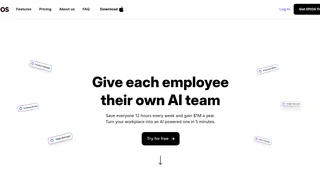
liftOS is an all-in-one productivity workspace that consolidates the tools, files, and communication teams use daily into a single unified interface. Rather than switching between separate tabs for notes, task management, file storage, chat, and third-party apps, teams work inside a structured workspace where everything is organized in one sidebar. Built for small to mid-size teams, agencies, and freelancers, liftOS aims to reduce the friction caused by tool fragmentation and context switching.
Key Features
- Built-in productivity apps -- Notes for documents and wikis, Todos for project and task management, Files for cloud storage, and Whiteboard for brainstorming. Each app is collaborative from day one, supporting real-time team editing and sharing.
- Google Workspace integration -- Google Sheets, Docs, and Slides run natively inside liftOS, so teams can use their existing Google files without leaving the workspace or opening separate browser tabs.
- Universal search across all tools -- Everything added to liftOS becomes instantly searchable. Users find documents, tasks, files, and embedded content from a single search bar, eliminating the need to hunt through multiple applications.
- Split View for side-by-side work -- Open two tools or documents adjacent to each other, such as taking notes in lift Notes while referencing a Google Sheet, reducing the back-and-forth that fragments attention.
- Folders and sections for workspace organization -- Team workspaces can be structured with nested folders and labeled sections, keeping projects, client work, and internal resources logically grouped and easy to navigate.
- Built-in Chat and Calendar -- Team communication and scheduling live inside the same workspace. Chat keeps conversations tied to projects, and Calendar tracks deadlines and events without requiring an external calendar app.
- 40+ workspace templates -- Pre-built workspace layouts for common workflows such as project management, team onboarding, client work, and knowledge bases help teams get started quickly.
- Embeddable external tools -- Beyond Google Workspace, any embeddable web tool can be added to a liftOS workspace, letting teams centralize access to their full software stack in one place.
How liftOS Works
Users create a workspace and populate it with sections and folders that reflect their team structure or project hierarchy. Within each section, they add liftOS built-in apps -- Notes, Todos, Files, Whiteboard -- alongside embedded external tools and Google Workspace documents. A persistent sidebar provides one-click navigation across the entire workspace. The universal search indexes everything, so locating a specific document, task, or embedded page takes seconds rather than minutes of tab switching. Team members can be invited with role-based access, and all built-in apps support real-time collaboration.
Pricing and Plans
liftOS offers three tiers. The Free plan includes 10 users, unlimited integrations, 20 app uses, 1GB workspace storage, a 100MB per-file upload limit, and 3 guest users. The Pro plan at 9 EUR per user per month adds unlimited app uses, 1TB workspace storage, no file upload limit, and 10 guest users. A Lifetime one-time purchase option covers 30 users, 10 guests, unlimited apps, and 1TB storage for 12 months, with the price increasing by 50 EUR for every 50 claims. All plans include the full set of built-in apps and integrations.
Pros and Cons
Pros:
- Consolidates notes, tasks, files, chat, and calendar into one interface, reducing the number of separate tools a team needs to manage.
- Native Google Workspace integration allows editing Sheets, Docs, and Slides without leaving the workspace.
- Universal search indexes all workspace content, making information retrieval faster than hunting across separate apps.
- Split View enables genuine side-by-side multitasking, such as referencing a document while writing notes.
- Free tier is generous for small teams with up to 10 users and core built-in apps included.
Cons:
- AI worker capabilities are mentioned in marketing but limited in scope compared to dedicated AI-native workspace tools that offer content generation and automation.
- Whiteboard is listed as coming soon, so the full built-in app suite is not yet complete for teams that rely on visual brainstorming.
- The 100MB per-file upload limit on the Free plan restricts teams working with large media or design files.
Who Should Use liftOS
liftOS is best suited for small to mid-size teams, agencies, and freelancers who juggle multiple tools daily and feel the drag of constant tab switching. Teams that already use Google Workspace will find the native integration especially valuable, as it keeps familiar workflows inside the unified workspace. Project managers, operations leads, and founders who need to maintain visibility across projects, documents, and team communication will benefit from the structured folder and section system. Larger enterprises with established tool ecosystems and strict compliance requirements may find the platform less mature than dedicated solutions in each category. Teams that depend heavily on advanced project management features like Gantt charts, resource leveling, or time tracking will find liftOS more of a lightweight coordination layer than a full project management replacement.