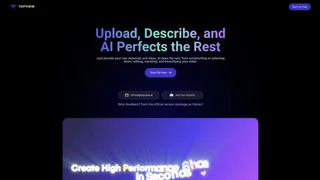
Topview AI is an AI video creation platform for marketers, ecommerce teams, creators, and growth operators who need to turn product URLs, prompts, images, and scripts into campaign-ready video content quickly. The product combines an AI video workspace, avatar tools, ad-focused generation flows, and an API layer in one platform. Rather than acting like a general-purpose editor first, Topview is built around performance marketing workflows such as product ads, UGC-style videos, affiliate content, and social media creatives.
Its strongest differentiator is the way it connects multiple inputs to ad production. Users can start from a prompt, a product page, a product image, or an avatar workflow, then use Topview to generate scripts, visuals, and finished marketing videos. That makes it relevant both to hands-on creative teams and to businesses that want repeatable video production at scale.
Key Features
- AI Video Agent and workspace. Topview can generate campaign-ready videos from prompts, product URLs, images, scripts, and avatars, which reduces the time needed to produce first drafts.
- URL-to-video workflow. The official guide shows a flow that extracts assets from a product page, generates three scripts automatically, and outputs multiple video styles from that source URL.
- Avatar and product-avatar tools. Topview supports AI avatars, product avatars, custom avatar design, and lip-sync workflows for presenter-led and UGC-style creative.
- Multi-model access. The platform and API expose models such as Veo, Sora, Seedance, Wan, Kling, Higgsfield, and Flux alongside Topview's own avatar and product workflows.
- Automation-friendly API. Topview offers one REST endpoint, unified billing, async task handling, and structured outputs for teams that want to automate media generation.
- Marketing-specific use cases. The product is packaged for advertising, ecommerce, DTC brands, affiliate marketing, AI live streams, and short-form social content.
How Topview AI Fits Marketing Workflows
Topview is designed around the kinds of assets marketing teams already have. In the documented URL-to-video flow, the platform pulls images and videos from a product page, lets the user add product details or selling points, generates scripts automatically, and creates multiple video options. That is a practical workflow for ecommerce teams that already have landing pages but do not want to script every ad manually.
Its AI Video Generator page positions the product as a workspace for ads, product videos, and social content that combines agent workflows, viral ad intelligence, avatars, editing tools, and video models. In other words, the platform is less about timeline-heavy editing and more about fast creative iteration around paid and organic marketing content.
Avatar and Product Presentation Tools
Avatar workflows are a major part of the platform. Topview's official guide describes Product Avatar as a tool that combines a product image with a lifelike AI avatar that can hold, showcase, or interact with the product. The workflow accepts a single product image and is aimed at UGC-style output.
That matters for brands, agencies, and affiliate marketers that need many creative variations without coordinating actors, filming, and editing teams for every campaign. Lip-sync and avatar customization also give users more control over presenter-led content and branded spokesperson formats.
API and Automation
Topview is also positioned as a developer-facing media platform. Its API product offers one account and one REST endpoint for text-to-video, image-to-video, URL-to-video, video avatar, product avatar, and product Anyshoot workflows. The company highlights async processing, polling with task IDs, signed file URLs, and rate-limit headers for production systems.
That makes Topview relevant not just to creators using the web app, but also to agencies, SaaS products, internal growth systems, and marketplaces that want to generate media programmatically instead of through one-off manual sessions.
Pricing and Plans
Topview publishes public pricing and starts free on several product and API pages, so the current model is best understood as freemium plus paid plans. Pro is listed at $29 per month with $348 billed annually and includes 960 credits per year, access to all video models, access to all image and editing models, 4 concurrent tasks, API and Claw automation support, and unlimited relax generation. Business is $75 per month with $900 billed annually and raises the allowance to 3,000 credits per year with 8 concurrent tasks. Ultra is $150 per month with $1,800 billed annually, 500 credits per month, and 12 concurrent tasks. Team starts at $130 per seat per month with $1,560 billed annually per seat and adds collaboration-oriented capacity.
Pros and Cons
Pros:
- Strong fit for ad, ecommerce, and UGC video production rather than generic editing alone.
- Supports multiple useful inputs, including URLs, prompts, product images, scripts, and avatars.
- Public pricing is available with clear differences in credits and concurrency across plans.
- Official affiliate program exists with recurring commissions for referred subscribers.
- API support makes the platform usable for automated and high-volume creative production.
Cons:
- The product is heavily oriented toward marketing and ad workflows, so it is less specialized for traditional long-form editing.
- Credit-based usage means teams need to manage model choice and output volume carefully on lower tiers.
- Higher concurrency and some of the better economics are reserved for more expensive plans.
- The feature surface is broad, which can create a learning curve for users who only need one simple workflow.
Who Should Use Topview AI
Topview AI is a strong fit for ecommerce brands, DTC teams, agencies, affiliate marketers, and creators who need to turn product assets into ad-ready video quickly. It is also a sensible choice for technical teams that want one API for AI video, avatar, and product-media workflows instead of stitching together many separate vendors.
It is a weaker fit for users who want a simple lightweight editor with no credit model, or for teams whose main need is traditional long-form post-production rather than ad iteration, avatar-driven content, and automated creative generation.