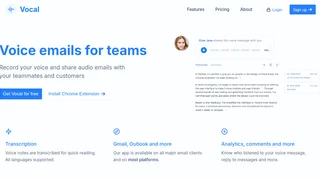
Vocal is a voice messaging tool that lets users record and send audio emails directly from their existing email client. Built as a Chrome extension for Gmail, Outlook, and other major platforms, Vocal enables teams and professionals to replace long typed emails with spoken voice notes. Recipients receive the voice message as an MP3 attachment or a shareable web link and do not need Vocal installed to listen. The tool includes automatic transcription in all supported languages, read-receipt analytics, and team commenting features.
Key Features
- One-click voice recording inside email clients. Vocal adds a record button directly into Gmail and Outlook interfaces, so users do not need to switch to a separate app or tool to compose a voice message.
- Automatic transcription across all languages. Every voice note is transcribed into text for quick reading. The transcription can be edited manually when corrections are needed, and it supports all languages the recording is made in.
- Analytics and listen insights. Vocal tracks who opened and listened to each voice note. The Pro plan sends real-time notifications when a recipient plays a message, giving senders visibility into engagement.
- Team commenting and collaboration. Team members can leave comments on shared voice messages to keep discussions organized within the platform. Pro users can create folders to manage voice notes by project or client.
- Custom branding and dedicated domain. Pro users can host voice messages on a custom domain (CNAME), add a profile picture, customize message signatures, and change colors and fonts to match their brand identity.
- Call-to-action buttons on voice notes. Pro plan users can insert custom CTAs into their voice messages, useful for converting leads or directing listeners to a booking page or product link.
- Mobile recording from the Gmail app. Users can record and send voice messages directly from their phone through the Gmail mobile app, enabling on-the-go communication.
How Vocal Works
After installing the Vocal Chrome extension, a record button appears inside Gmail or Outlook when composing a new email. The user clicks the button, speaks their message, and Vocal attaches an MP3 file and a web-player link to the email. The recipient can play the audio directly from their inbox or open the link in a browser. No software installation is required on the recipient's side. The sender can later check the Vocal dashboard to see whether the recipient listened to the message and for how long.
Vocal also offers a web application where users can manage their voice notes, review analytics, and access team features. For Pro subscribers, the web app provides folder management, listen notifications, webhook integrations with other tools, and advanced customization options.
Pricing and Plans
Vocal offers a Free plan and a Pro plan with monthly and annual billing options.
| Plan | Price | Voice Messages | Recording Time | Key Features |
|---|
| Free | $0/month | 20 per month | 1 minute per message | Basic voice messaging, MP3 attachment, web link sharing |
| Pro (Monthly) | $30/user/month | Unlimited | Unlimited | Transcription, analytics, custom domain, CTA buttons, folders, webhooks, full customization |
| Pro (Annual) | $299/user/year | Unlimited | Unlimited | Same as Pro Monthly, with a 17% discount compared to monthly billing |
The annual Pro plan works out to approximately $24.92 per user per month. Vocal also offers sponsorships to students and those who cannot afford the Pro plan upon request by emailing the team.
Integrations and Platform Support
Vocal is available as a Chrome extension and integrates into Gmail, Outlook, Front, Microsoft Teams, and Zendesk. The web application works on any modern browser. On mobile, users can send voice messages through the Gmail app on iPhone and Android. Vocal also supports Google Meet for adding voice notes to meeting follow-ups. The Pro plan includes webhooks that allow connecting Vocal with external tools and workflows.
Pros and Cons
Pros:
- Recipients do not need Vocal installed to listen to voice messages
- Free plan available with 20 messages per month for individuals testing the tool
- Automatic transcription supports all languages and is editable
- Generous affiliate program offering 40% recurring commission on referred customers
- Mobile support through the Gmail app on both iPhone and Android
- Chrome extension works inside existing email workflow without switching tools
Cons:
- Free plan limits recordings to 1 minute, which is restrictive for detailed explanations
- Pro pricing at $30 per user per month is higher than some async video messaging alternatives
- No native desktop application; relies entirely on the Chrome extension and web app
- Free plan lacks transcription, reducing its value for accessibility and quick scanning
Who Should Use Vocal
Vocal is well suited for coaches, consultants, and customer success professionals who need to send personal, warm responses to clients at scale without the time cost of typing long emails. Sales teams can use the CTA feature on Pro plans to guide prospects to next steps after a voice pitch. Small business owners who handle client communication personally will find the personal touch of voice messages valuable for building relationships. Teams that collaborate across time zones can use voice notes to reduce the back-and-forth of async text threads.
Vocal is less suitable for users who primarily need to send short, quick messages, since the 1-minute limit on the Free plan can feel restrictive. Organizations with strict data compliance requirements may need to review Vocal's privacy policy before adopting it for sensitive communications. Users who prefer video over audio for async communication may find tools like Loom a better fit.