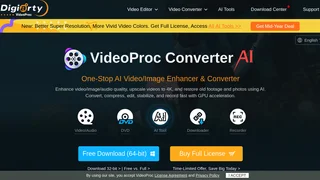
VideoProc Converter AI is a one-stop AI-powered media processing solution developed by Digiarty Software, a multimedia company established in 2006 with over 5.2 million users across 180 countries. The software combines GPU-accelerated video conversion, AI Super Resolution upscaling, intelligent compression, a full editing toolkit, a built-in media downloader, and a screen recorder into a single application. It is designed for creators, videographers, and everyday users who work with 4K and high-resolution footage from GoPro, DJI, iPhone, Android, DSLR, mirrorless cameras, and action cams.
Key Features
- AI Super Resolution: Upscale low-resolution, grainy, or old videos and photos to 4K using deep learning models. The AI engine enhances resolution, boosts frame rates, reduces blur and noise, smooths interlacing artifacts, and refines color rendition for visibly sharper output.
- Video Conversion: Supports over 370 input codecs and 420 output formats, handling all common transcoding tasks from H.264 to H.265 (HEVC), MKV to MP4, AVI to YouTube, and 3D to 2D. GPU acceleration with auto-copy mode achieves over 1,000 FPS for lossless remuxing without re-encoding.
- Video Compression: Compress large 4K and HD video files by up to 90 percent while preserving near-lossless visual quality. Fine-tune bitrate, choose VBR or CBR, and use 2-pass encoding for optimal results.
- Video Editing: Cut, crop, merge, rotate, and flip footage non-destructively. Apply visual effects and filters including grayscale, mirror, edge, painting, and sharpen. Add hardcoded or soft-coded subtitles from external SRT, ASS, or SSA files, or search subtitles online for movies and TV episodes. Adjust brightness, contrast, hue, gamma, and saturation.
- Media Downloader: Download videos, audio, playlists, and live streams from over 1,000 popular sites and 2,000 niche platforms. Supports batch downloading, M3U8 streams, and proxy server configuration. Downloaded videos can be automatically converted to MP4, MP3, or mobile-ready formats.
- Screen Recorder: Record desktop, webcam, picture-in-picture, or audio-only with four recording modes. Includes green screen (chroma key) recording for virtual backgrounds, system sound and microphone capture, and on-screen annotation tools for drawing, highlighting, and adding text during recording.
Use Cases
- Action Cam Footage: Stabilize and compress GoPro or DJI bike, snowboard, and surf clips for sharing on WhatsApp or social media. Convert drone footage while preserving 4K quality.
- Archive Restoration: Upscale old home videos, digitized VHS tapes, and low-resolution clips into sharp 4K video with AI enhancement and frame rate smoothing.
- Content Creation: Record gameplay, webinars, tutorials, and product reviews. Edit, merge, add subtitles, and export in platform-optimized formats for YouTube, TikTok, and Instagram.
- Mobile Video Workflow: Transcode footage from iPhones and Android devices that may not play smoothly on computers or editing software, converting to widely compatible formats.
- Surveillance Footage: Crop specific areas from 4K security camera recordings with minimal quality loss, and compress large archive files for long-term storage.
Supported Formats and Devices
VideoProc Converter AI works with video from GoPro, DJI, iPhone, Android, DSLR, mirrorless cameras, camcorders, and surveillance systems. It supports professional formats including raw and uncompressed video. Output covers MP4, MKV, AVI, MOV, HEVC, H.264, GIF, WebM, and dozens of device-specific presets for Apple, Android, gaming consoles, and smart TVs. Audio formats include MP3, AAC, FLAC, WAV, and more.
Pricing
VideoProc Converter AI offers a free trial with basic functionality. Paid licenses unlock the full feature set including unlimited AI processing and premium support.
| License | Price | Coverage |
|---|
| Premium 365 | $25.95/year | 3 PCs, 1-year subscription with all AI tools, updates, and support |
| Lifetime | $39.95 | 1 PC, one-time payment with lifetime access and free updates |
| Family Lifetime | $59.95 | Up to 5 PCs, one-time payment with lifetime access for households and small teams |
All paid licenses include a 30-day money-back guarantee. Discounted pricing is frequently available through promotional deals. The software is available for both Windows (64-bit and 32-bit) and macOS.