What is Picbolt?
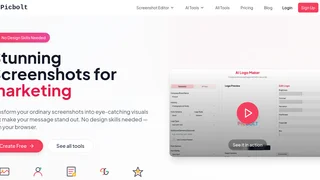
Picbolt is a browser-based screenshot editor and design tool that transforms ordinary screenshots into professional marketing visuals. Created by Sohail Hussain, it lets users capture screenshots from any URL or upload existing ones, then apply frames, backgrounds, shadows, and presets with a single click. The platform requires no design skills and all processing runs directly in the browser, meaning no software installation is needed. Users have created over 20,000 visuals with the tool to date.
Picbolt is offered as a lifetime deal on AppSumo and as a standalone product on its own website. The platform has attracted over 900 users and provides more than 100 templates alongside 15+ AI-powered tools. It is part of a family of products that also includes Gubb, SmartSpreadsheets, Mailneo, and Screenbolt.
Key Features
Picbolt provides over 40 tools across multiple categories, organized around a central editor interface:
- Screenshot Mockups: Capture screenshots from any URL or upload existing images. Apply 20+ ready-made presets with frames, backgrounds, and shadows in a single click. Smart cropping and auto-resizing handle social media dimensions automatically, saving manual adjustment work.
- Device Mockups: Display apps or websites in realistic device frames suitable for App Store screenshots, Google Play listings, and portfolio websites. These mockups help present digital products in a professional context that matches real-world usage.
- Code Snippets: Generate beautified code screenshots with customizable themes and syntax highlighting. This feature is particularly useful for developer documentation, blog posts, tutorials, and social media posts that share code examples.
- AI Logo Maker: Generate logos and icons using AI. Full AI tools access requires providing your own OpenAI API key, which keeps your data private and gives you control over usage costs.
- Image Tools and Editor: Add text, images, code blocks, arrows, and icons to designs. Apply gradients, colors, and overlays that match brand identity. The editor provides granular control over every design element while remaining accessible to non-designers.
- Social Proof Graphics: Create tweet screenshots and testimonial cards that boost credibility on websites, landing pages, and marketing materials. These pre-formatted graphics help businesses showcase customer feedback professionally.
How It Works
Picbolt operates entirely in the browser. Users start by either pasting a URL to capture a screenshot or uploading an existing image file. The editor provides a visual canvas where presets can be applied with one click, instantly wrapping screenshots in frames, adding shadows, and setting backgrounds. From there, users customize text, colors, overlays, and other elements to match their branding. The platform exports in standard quality on the free plan and 4K resolution on the lifetime plan, with no watermark on either tier.
Who Uses Picbolt?
The platform serves a wide range of users across different professions. Content creators use it for YouTube thumbnails, blog post illustrations, social media content, and online course materials. Developers rely on the code snippet beautifier for documentation and technical blog posts. Educators annotate screenshots with explanations and highlights for tutorials, remote learning, and digital classrooms. Small business owners create product demonstrations, marketing graphics, customer guides, and website visuals without hiring professional designers. Social media managers produce branded visual content, campaign reports, and engagement posts that maintain visual consistency across platforms. Project managers document progress with visual reports, team guidelines, and workflow diagrams for stakeholder communication. Creative professionals use the tool for portfolio presentations, client mockups, and design iteration visuals.
Pricing
Picbolt offers two plans with a one-time lifetime payment model. There are no recurring subscriptions or hidden fees. Both plans include no-watermark exports.
- Free Plan ($0/month): Limited access to tools, basic templates, 3 mockup downloads per day, standard quality exports, standard support, and limited mockups. AI tools access is included at a basic level. No credit card required to get started.
- Lifetime Plan ($199 one-time, regularly $299): Full access to all 40+ tools, all basic and premium templates, unlimited mockup downloads, premium mockups, 4K quality exports, priority support, full AI tools access (OpenAI API key required), and custom branding. The purchase includes $10,000 in GPT-image-1.5 credits for AI visuals. Use discount code GET10 for an additional 10% off. The Lifetime plan includes all future updates and new features at no extra cost.
Affiliate Program
Picbolt does not appear to offer an affiliate or partner program at this time. No affiliate page was found on the website and the footer navigation does not mention any referral or commission opportunities. The platform sells directly through its website and through the AppSumo marketplace.