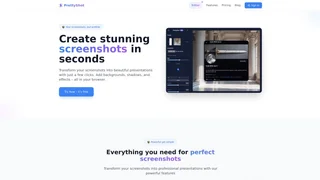
PrettyShot is an in-browser screenshot enhancement tool that lets content creators, marketers, and developers transform ordinary screenshots into polished visual presentations by adding backgrounds, shadows, reflections, device mockups, presets, and AI-powered effects. The entire workflow happens in the browser without requiring any downloads, installations, or desktop design software.
Key Features
- Backgrounds: Apply solid colors, gradients, or upload custom images with blur effects to frame screenshots. The Pro tier adds AI background generation that creates tailored backgrounds from text descriptions, enabling unique visuals without design software.
- Visual Effects: Enhance screenshots with shadows, reflections, overlays, vignettes, and noise filters. Pro subscribers gain access to AI-powered background removal and additional overlay options, giving screenshots a professional studio look.
- Device Mockups: Present screenshots inside realistic device frames including iPhones, Android phones, tablets, laptops, and browser windows. Supports both portrait and landscape orientations, useful for app store listings, product demos, and social media posts.
- Presets: Save and instantly apply custom combinations of backgrounds, effects, and mockup settings. The Free plan includes one preset slot, while Pro provides unlimited presets for consistent branding across projects.
- In-Browser Editor: All editing happens directly in the browser without downloads or installs. The editor provides a clean interface with side-by-side preview and editing controls.
Use Cases
- Content creators and social media managers can produce eye-catching visuals for Twitter, LinkedIn, Instagram, and blog posts without leaving the browser or switching to desktop design tools.
- Marketing professionals create consistent, on-brand screenshot presentations for landing pages, case studies, email campaigns, product demos, and advertising creatives across multiple channels.
- Software teams and product managers quickly generate polished feature screenshots and UI mockups for documentation, release notes, changelogs, app store listings, and investor presentations.
- Educators and technical writers produce clear, visually enhanced tutorial screenshots that help readers follow step-by-step instructions more easily.
Pricing
PrettyShot is free to use with basic customization, standard effects, one saved preset, and a watermark on exported images. The Pro plan costs $5 per month or $40 per year and removes the watermark, unlocks AI background removal and generation, adds vignette and noise effects, enables image overlays, and provides unlimited preset slots. No credit card is required to start with the free tier.
Privacy and Security
Image processing occurs directly in the browser, meaning screenshots are not uploaded to external servers for processing. PrettyShot is operated by SilverStagStudios. The privacy policy, terms of service, and cookie policy are published on the website.