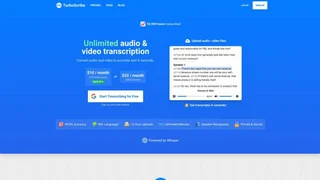
TurboScribe is an AI-powered transcription platform that converts audio and video files into accurate text using OpenAI's Whisper model. Launched in 2023, it offers unlimited transcriptions on its paid plan with GPU-accelerated processing that handles files up to 10 hours long and 5GB in size. The platform supports transcription and translation across 134+ languages, with multiple export formats and three distinct transcription modes for different accuracy and speed needs. TurboScribe is used by content creators, researchers, journalists, students, and professionals who need to turn recordings into structured, editable text quickly and reliably.
How It Works
Users upload audio or video files through the browser-based interface, and TurboScribe's GPU-powered engine processes them using Whisper, the speech recognition model from OpenAI. The platform does not require software installation and works entirely through the web. Files can be uploaded individually or in batches of up to 50 at a time on the paid plan. Once transcribed, results are available in multiple export formats including TXT, DOCX, PDF, SRT, and VTT for subtitles. All data is encrypted in transit via HTTPS/SSL and at rest using AES-256 encryption, and TurboScribe states that uploaded content is never used to train AI models.
Transcription Modes
TurboScribe offers three processing modes that trade off speed and accuracy, built on different sizes of the Whisper model:
- Cheetah Mode: Optimized for speed, transcribes roughly 1 hour of audio in about 30 seconds. Best for quick drafts, rough notes, or when turnaround time is the priority.
- Dolphin Mode: Balances speed and accuracy, processing about 1 hour of content in roughly 3 minutes. Suitable for everyday use such as meetings, lectures, and general transcription.
- Whale Mode: Prioritizes accuracy using larger Whisper models, completing 1 hour of transcription in under 10 minutes. Recommended for interviews, research, and content where precision matters most.
Key Capabilities
- Unlimited transcriptions: The Unlimited plan removes all daily caps, allowing users to transcribe as many files as needed.
- Large file support: Each file can be up to 10 hours long or 5GB in size, with batch uploads of up to 50 files simultaneously.
- 134+ language translation: In addition to transcription, TurboScribe can translate transcripts into over 134 languages.
- Speaker identification: The platform can distinguish between speakers in multi-person recordings and label them in the transcript.
- Wide format support: Compatible with MP3, MP4, M4A, MOV, AAC, WAV, OGG, OPUS, MPEG, WMA, and YouTube content.
- Multiple export formats: Download transcripts as TXT, DOCX, PDF, or subtitle formats SRT and VTT for video workflows.
- Bulk export: Export multiple transcripts at once for large-scale processing.
Use Cases
- Content creation: Transcribe video and podcast content into text for blog posts, show notes, captions, and repurposing across platforms.
- Meetings and interviews: Convert recorded meetings, interviews, and focus groups into searchable, shareable text documents.
- Academic research: Transcribe lectures, seminars, and research interviews for qualitative analysis and note-taking.
- Journalism and media: Quickly turn recorded interviews into editable text for articles and reports.
- Accessibility: Generate subtitles and transcripts for video content to meet accessibility requirements.
Plans and Pricing
Two tiers with a freemium model, and annual billing on the Unlimited plan saving 50% versus monthly.
| Plan | Price | Key Features |
|---|
| Free | $0 | 3 transcripts/day, 30 min per file, single upload, lower priority processing |
| Unlimited | $10/mo ($120/yr) | Unlimited transcriptions, 10-hour files, 5GB uploads, 50-file batch, 134+ languages, all modes, bulk export, highest priority |
The Free plan is suitable for light, occasional use with short recordings. The Unlimited plan targets frequent users who process large volumes of audio and video content. Payment is processed through Stripe, and users can cancel anytime from account settings.
Privacy and Security
TurboScribe encrypts all data in transit using HTTPS/SSL and at rest with AES-256 encryption. Uploaded audio and transcription files are only accessible to the account owner. The platform explicitly states it does not use user content to train AI models. Users can export or permanently delete their data at any time. Payment information is handled by Stripe and not stored directly by TurboScribe. The privacy architecture follows standard cloud security practices and is suitable for general transcription use cases, though users handling highly sensitive or regulated data should evaluate fit independently.
Limitations and Considerations
Transcription accuracy depends heavily on audio quality. Clear, well-recorded speech with minimal background noise produces the best results, while noisy environments, overlapping speakers, strong accents, or low-quality recordings may reduce reliability, a limitation shared across most AI transcription tools. The Free plan processes files at lower priority, which can mean longer wait times during peak usage. TurboScribe is built for asynchronous transcription of recorded files rather than real-time live transcription, so users needing live meeting transcription may find tools like Otter.ai more suitable. Speaker identification works best with clearly separated audio channels and may be less reliable with heavily overlapped speech.