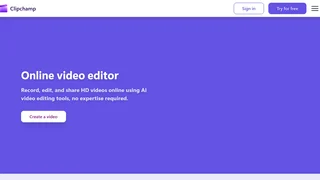
Clipchamp is Microsoft AI-powered online video editor that enables anyone to create, edit, and share professional-looking videos directly from a web browser or Windows desktop app. Originally founded in Australia in 2014, Clipchamp was acquired by Microsoft in 2021 and is now integrated into the Microsoft 365 suite, serving millions of everyday video editors, content creators, educators, and businesses worldwide.
Key Features
- AI Auto Compose: Quickly generate engaging short videos by adding photos and clips, picking a style, and letting the AI produce a polished result for social media.
- AI Voiceover Generator: Turn text into lifelike speech using over 400 AI voices across multiple languages. Adjust pitch and pace to match the narration style.
- AI Subtitle Generator: Automatically generate accurate captions in over 80 languages with voice detection technology. Edit font styles, colors, and subtitle placement.
- AI Silence Removal: Detect and remove pauses over 3 seconds in recordings. Preview and accept AI suggestions to create smooth demos, podcasts, and vlogs.
- AI Background Noise Removal: Boost voice clarity by eliminating street noise, wind, ambient sounds, and other background distractions from video and audio recordings.
- AI Background Removal: Remove or replace image backgrounds in seconds. Isolate subjects and create transparent overlays for watermarks or social media graphics.
- Screen, Camera, and Voice Recorder: Record screen activity, webcam footage, and voice audio directly from the browser. Enjoy unlimited retakes with AI-enhanced sound and video quality.
- Video Editing Essentials: Trim, crop, rotate, resize, and overlay videos. Apply filters, effects, color correction, green screen compositing, and animated text titles.
- Royalty-Free Content Library: Access thousands of stock videos, images, music tracks, sound effects, stickers, and GIFs across various genres for commercial and personal use.
- Brand Kit Tool: Maintain consistent branding with custom logos, colors, and fonts applied across all video projects.
Use Cases
- Social Media Content: Create YouTube videos, YouTube Shorts, TikTok clips, Instagram Reels, and Facebook ads using platform-specific templates and aspect ratios.
- Business and Marketing: Produce promo videos, demo videos, presentations, training materials, and corporate communications with professional polish and brand consistency.
- Education: Teachers and students can create instructional videos, slideshows, narrated presentations, and video assignments with accessibility features like auto captions.
- Personal Projects: Edit family videos, travel montages, gaming highlights, and meme videos with simple drag-and-drop tools and no prior editing experience needed.
Integrations
Clipchamp integrates with Microsoft OneDrive for cloud backup and seamless project access across devices. It also supports direct publishing to YouTube, TikTok, and LinkedIn. Additional integrations include Dropbox for importing media, Xbox for gaming content, and GIPHY for adding animated stickers and GIFs to videos.
Pricing
Clipchamp offers a free tier that includes all core editing tools, AI features, watermark-free 1080p HD exports, and access to free stock assets. Premium features including 4K UHD exports, premium stock content, premium filters and effects, and the brand kit tool are available through a Microsoft 365 Personal or Family subscription. Clipchamp is also included with select Microsoft 365 business and education licenses, with full premium access and AI video creation available through Copilot licenses.
Privacy and Security
As a Microsoft product, Clipchamp adheres to Microsoft privacy and security policies. Users can record, edit, and share videos with privacy guaranteed. Content is backed up via OneDrive integration, and sharing is handled through secure links.