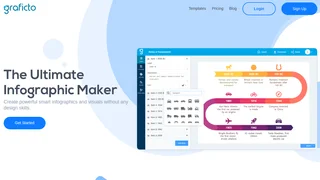
Graficto is a smart infographic maker that combines AI-powered generation with dynamic template-based design. Built by Firolab Innovations, it helps marketers, content creators, educators, and business professionals produce charts, process diagrams, comparison visuals, and list-based infographics without needing graphic design experience. Unlike traditional shape-based tools where you manually reposition every element, Graficto automatically adjusts layouts as you edit content, letting you focus on the message rather than the mechanics.
Key Features
- Smart dynamic visuals. Infographics in Graficto are not static shapes. When you add, remove, or edit items, the entire visual reflows automatically. This saves significant time when iterating on designs or updating data in an existing visual.
- AI-powered creation. You can generate an infographic by typing a short description of what you need. The AI produces a complete visual layout that you can then customize, making it useful for last-minute presentation graphics or quick social media posts when time is limited.
- Hundreds of templates. The template library covers lists, processes, cycles, charts, comparisons, timelines, and more. Each template is professionally designed and serves as a starting point that you can adapt to your own content and branding.
- Custom color palettes and fonts. Graficto includes a library of preselected color palettes and font combinations. You can also create and save your own custom palettes to match brand guidelines across multiple infographics for consistent visual identity.
- Vector format export. Premium users can export infographics in SVG format alongside standard high-resolution raster formats. Vector export is essential for print materials, large-format displays, and professional design workflows where scalability matters.
- Chart and data visualization. Beyond text-based infographics, Graficto supports data-driven charts that help present statistics, survey results, and numerical comparisons in a clear, visually structured format.
How It Works
You begin by selecting a template from the library or using the AI generator to create a starting layout from a text prompt. Once the base infographic is generated, you edit text, swap icons, adjust colors, and reorder elements directly in the browser. Graficto handles the layout adjustments automatically, so adding a new list item or extending a process step does not break the design. The finished visual can be exported in multiple formats including PNG, JPG, and SVG, ready for use in presentations, blog posts, social media, or print publications.
Pricing and Plans
Graficto offers two straightforward plans. The Standard plan is free with no credit card required and includes up to 5 saved visuals with access to free templates. The Premium plan costs $5.00 per month when billed monthly or $50.00 per year, which works out to approximately $4.16 per month on the annual plan. Premium unlocks unlimited infographics, premium templates, premium color palettes, and vector (SVG) export. Payment is accepted via Visa, Mastercard, American Express, PayPal, and Apple Pay. Cancellation is available at any time from account settings, with premium features remaining accessible until the end of the current billing period. Graficto does not offer refunds on subscription payments.
Output Formats and Licensing
The Premium plan supports high-resolution PNG and JPG exports suitable for digital use, as well as SVG vector export for print and professional design workflows. Users retain ownership of the infographics they create, and the visuals can be used for both personal and commercial purposes without additional licensing fees.
Pros and Cons
Pros:
- AI generation creates complete infographics from simple text prompts, saving design time for non-designers
- Dynamic layout system automatically reflows elements when content changes, eliminating manual repositioning
- Free tier available with no credit card required, letting users test core functionality before committing
- Vector (SVG) export on the Premium plan supports professional print workflows and large-format output
- Custom color palette feature allows brand-consistent output across multiple visuals and campaigns
Cons:
- Free plan is limited to 5 saved visuals, which is restrictive for regular content creators and marketing teams
- No refunds on subscription payments after purchase, making the annual commitment riskier
- Platform is web-only with no native mobile or desktop application for offline access
- Template library is focused on infographic formats and lacks support for other common design types like social media banners or multi-page document layouts
Who Should Use Graficto
Graficto is best suited for marketers, bloggers, educators, and business professionals who need to create clear, visually structured infographics and charts without learning complex design software. The AI generation feature makes it particularly useful for anyone who needs a polished visual on short notice, such as during meeting preparation or content publishing deadlines. It is less ideal for users who need a full-featured graphic design platform covering social media banners, multi-page documents, or advanced photo manipulation. The 5-visual cap on the free plan also makes it impractical for high-volume content teams unless they upgrade to Premium.