Categories
Overview
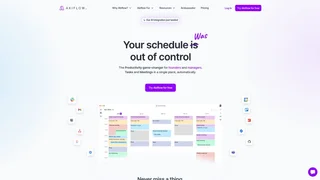
Akiflow is a time-blocking productivity platform that combines calendar management, task planning, and an AI assistant into a single desktop and mobile application for busy professionals, founders, and teams. Trusted by over 10,000 professionals, it replaces the workflow of switching between separate calendar, task management, and note-taking tools.
How It Works
Akiflow unifies calendars, tasks, and communications in one workspace. Users connect their Google or Outlook calendars with two-way sync, import tasks from project management tools, and centralize incoming items through a universal inbox. The platform applies time-blocking methodology to automatically schedule tasks into available calendar slots, converting a flat to-do list into a structured daily and weekly plan. Users can organize tasks into projects, apply labels for categorization, and set priorities that inform the scheduling engine.
The integrated AI assistant, named Aki, is accessible via chat, voice commands on mobile, and keyboard shortcuts. Aki can interpret natural language requests to create events, move tasks, check availability, set reminders, and provide daily briefings. Users can ask Aki questions such as what their day looks like or whether they have time for specific tasks, receiving answers grounded in their current calendar and task data. Aki can also initiate outbound phone calls to contacts for scheduling purposes.
Key Capabilities
- Unified calendar and task management: Syncs Google Calendar and Outlook Calendar with two-way sync, and displays tasks and scheduled events in a single timeline view for drag-and-drop planning.
- AI assistant (Aki): Handles natural language commands for scheduling, task creation, prioritization, and daily planning. Supports voice commands on mobile and desktop, and can initiate outbound phone calls to contacts.
- Universal inbox: Aggregates tasks, emails, and notifications from integrated services into a central inbox for triage, categorization, and processing.
- Smart time blocking: Automatically suggests optimal time slots for tasks based on user availability, priorities, and deadlines. Supports recurring task scheduling and availability sharing via meeting links.
- Quick capture: Enables adding tasks, events, or notes from anywhere using the Cmd+K shortcut, mobile widgets, voice input, or share extensions.
- Focus mode and goals: Provides distraction-free work sessions with a dedicated timer and goal-tracking features that align daily actions with longer-term objectives.
- Analytics and insights: Delivers productivity metrics including task completion rates, time allocation patterns, and planning consistency over configurable periods.
- Daily rituals and routines: Supports configurable daily start and end routines that automatically prepare the day focus areas, review pending items, and plan upcoming tasks.
Integrations
Akiflow connects natively with Google Calendar, Outlook Calendar, and over 10 additional services including Slack, Notion, Todoist, Asana, Trello, Linear, and Gmail. Through Zapier and IFTTT, the platform extends to thousands more applications. Users can also leverage the Akiflow API for custom integrations. The platform is available on macOS, Windows, iOS, and Android, with full offline mode support for calendar and task access without an internet connection.
Use Cases
- Founders and executives: Centralize meetings, strategic initiatives, and team coordination into a single daily plan with AI-assisted scheduling and prioritization.
- Freelancers and consultants: Manage client work, deadlines, and personal commitments using time blocking and automated daily planning, reducing context switching.
- Remote and hybrid teams: Coordinate availability across time zones, schedule meetings using shared availability links, and track shared project milestones.
- Productivity enthusiasts: Apply structured time-blocking methodology with science-based planning features, daily rituals, and detailed performance analytics to optimize personal effectiveness.
Privacy and Security
Akiflow processes user calendar and task data to provide its scheduling and AI features. The application stores data securely and offers standard security practices. Users concerned about data handling can review the Akiflow privacy policy and security documentation on the official website.
Pricing
Akiflow offers a Pro Monthly plan at $34 per month and a Pro Yearly plan at $19 per month billed annually, representing a 44 percent annual saving. Both plans include unlimited integrations, unlimited tasks, unlimited meetings, and full access to the Aki AI assistant with a 7-day free trial. Team pricing and discounted rates for university students and researchers are available by contacting the sales team.
Tool Overview
Pricing
Similar AI Tools
Brilliant Directories
Brilliant Directories is a white-label platform for launching membership sites, online directories, and community websites with built-in payments, SEO, and AI tools.

Poppy AI
Multiplayer AI workspace for analyzing videos, podcasts, PDFs, and voice notes to create viral content and brainstorm ideas collaboratively.

Stability AI Developer Platform
Stability AI is a developer platform for building image, video, audio, and 3D applications with APIs, sandbox tools, and credit-based pricing.
ChatGPT Code Interpreter
OpenAI sandboxed Python environment within ChatGPT that executes code, analyzes data, creates visualizations, and processes files through natural language conversations.
TeamPal
No-code AI workforce platform for building, customizing, and deploying AI agents across marketing, sales, HR, operations, finance, R&D, design, and IT departments.