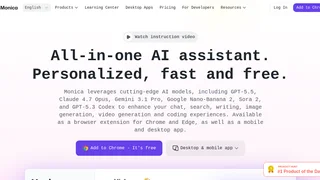
Monica is an all-in-one artificial intelligence assistant designed to streamline professional and creative workflows directly within the browser, desktop, or mobile devices. Available as a browser extension, native desktop app, and mobile app, Monica integrates multiple frontier AI models, including GPT-5.5, Claude 4.7 Opus, Gemini 3.1 Pro, and Sora 2, into a unified sidebar interface. This centralized design eliminates the need for users to manage multiple subscriptions or switch between tabs. By providing immediate access to chat, writing, web search, real-time translation, and image editing tools, Monica functions as a comprehensive co-pilot that enhances daily productivity for writers, researchers, developers, and founders.
Key Features
- Multi-Model AI Chat: Allows users to converse with leading AI models from a single interface and compare answers side-by-side to determine the best-suited response for their specific task without losing conversation context.
- Intelligent Browser Sidebar: Integrates a sidebar extension for Google Chrome, Microsoft Edge, and Safari that offers one-click access, smart toolbar actions, and context-aware writing assistance on any web page.
- Document and Video Summarization: Summarizes lengthy articles, PDF reports, and YouTube videos into structured outlines, key takeaways, and timestamped highlights, allowing users to absorb long-form content in seconds.
- AI Writing and Templates: Features a library of over 80 pre-built writing templates that assist users in drafting emails, composing social media posts, writing reports, and optimizing marketing copy.
- Web-Connected AI Search: Conducts real-time searches across the internet to answer queries with up-to-date information, displaying source citations and search results alongside standard search engine results pages.
- Creative Media Utilities: Provides built-in tools for AI image generation, image-to-image editing, watermark removal, ChatPDF document conversations, OCR text extraction, and automated mind map creation.
- Developer Integration: Connects with popular developer environments through Monica Code extensions for VS Code and JetBrains, providing inline code suggestions, debugging advice, and explanation tools.
How It Works
Monica functions by routing user queries through a cloud-based API gateway that connects to various underlying AI models. When a user highlights text on a webpage or submits a prompt in the sidebar, the browser extension captures the context and sends it to Monica's servers. The platform manages model orchestration, translating the user's intent and applying the appropriate model based on availability and subscription tier. To maintain a smooth user experience, Monica caches conversation histories, manages API rate limits, and utilizes a credit-based consumption system where advanced reasoning models deduct higher amounts of "Advanced Credits" than simpler everyday models.
Pricing and Plans
Monica operates on a freemium model offering a free tier with daily query caps alongside premium subscriptions that unlock advanced models and higher credit allowances.
| Plan | Price | Key Features |
|---|
| Free Plan | $0 | Access to basic chat models, daily usage limits, and standard translation and web summarization tools. |
| Pro Plan | $9.90/month | Access to advanced models (GPT and Claude), higher daily limits, full writing templates, and monthly credit allowance. |
| Max / Ultra Plans | Tiered | Unlimited basic queries, large allocations of Advanced Credits for image generation, AI agents, and priority support. |
Advanced features like high-fidelity image generation and autonomous AI agent operations consume Advanced Credits. Free users can purchase additional credit packs if they exhaust their daily allowance without upgrading their subscription.
Pros and Cons
Pros:
- Consolidates access to multiple frontier AI models under a single account.
- Provides deep browser integration that makes context retrieval and page actions seamless.
- Synchronizes libraries and histories across extension, desktop, and mobile platforms.
- Speeds up research tasks with automated video and PDF summarization.
Cons:
- Free tier limits can be restrictive for daily professional workflows.
- The massive list of features and settings can be overwhelming for new users.
- Access to top-tier models is locked behind paid monthly subscriptions.
Who Should Use Monica
Monica is best suited for knowledge workers, content creators, researchers, and developers who spend their workdays in a web browser and require inline AI assistance. It is particularly valuable for professionals who need to summarize large volumes of research, write multi-lingual documents, or frequently compare outputs from different AI models. While casual users can leverage the free tier for quick lookups, daily professional users will find the paid plans essential for maintaining uninterrupted productivity throughout the day.