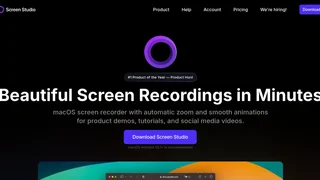
Screen Studio is a macOS screen recording application designed to produce polished, professional-looking videos with minimal manual effort. It targets developers, content creators, educators, and product teams who need to create tutorials, product demos, or social media content without spending hours in video editing software. The app distinguishes itself through automatic cursor tracking and zoom effects, smooth animations, and built-in visual polish that would otherwise require manual keyframing in a dedicated video editor.
Key Features
- Automatic Zoom and Cursor Tracking --- Screen Studio follows your cursor and zooms into the area you are interacting with, creating smooth pans and transitions automatically. Clicks receive subtle highlight effects, making it easy for viewers to follow exactly what you are doing on screen.
- Cursor Smoothing and Highlighting --- Shaky, rapid cursor movements are smoothed into natural-looking motion. You can adjust the cursor size after recording, hide the cursor when it is not adding value, and replace system cursors with high-resolution versions for a cleaner look.
- Branding and Styling Tools --- You can customize the background behind your recording with solid colors, gradients, or images. Adjustable padding, rounded corners, drop shadows, and inset controls let you match your brand aesthetic without post-production work.
- Webcam, Microphone, and System Audio Recording --- The app supports simultaneous recording of your screen, webcam overlay, microphone input, and system audio. Voice volume is normalized and background noise is removed automatically for cleaner audio.
- iOS Device Recording --- Connect an iPhone or iPad via USB to record mobile app demos. Screen Studio automatically detects the device model and color, offering a range of device frames to choose from.
- Automatic Transcript and Subtitles --- Screen Studio can generate a transcript of your recording and add it as subtitles. All processing happens on your machine with no data sent to external servers.
- Export and Sharing Options --- Export videos in up to 4K resolution at 60 frames per second, or create optimized GIFs. Presets for web, social media, and further editing automatically select the best technical settings. You can also generate shareable links or copy video directly to the clipboard.
How Screen Studio Works
Screen Studio operates as a native macOS application. You begin by selecting your recording area --- a full screen, a specific window, or a custom region. As you record, the app continuously analyzes your cursor position and on-screen actions. After you stop recording, Screen Studio processes the footage, applying automatic zooms, cursor smoothing, and any other effects you have configured. The timeline view lets you drag and adjust zoom points, trim segments, and speed up or cut parts of the recording. All animation is handled procedurally, so you never need to set individual keyframes.
Video Quality and Output Formats
Screen Studio supports export at resolutions up to 4K at 60 fps. You can export horizontal videos for platforms like YouTube or convert to vertical format for TikTok, Instagram Reels, and YouTube Shorts with a single click --- the app automatically adjusts all zoom and animation timings for the new aspect ratio. Motion blur can be applied to make movement appear more natural, mimicking the look of a professional video editor's output. GIF export is available for lightweight, loopable content.
Pros and Cons
Pros:
- Automatic zoom and cursor effects create polished recordings with zero manual keyframing, saving hours of post-production work for tutorial and demo content.
- Built-in styling options (backgrounds, shadows, rounded corners) eliminate the need for a separate video editor to add visual polish.
- On-device transcript and subtitle generation preserves privacy since no audio data leaves your machine.
- One-click vertical output conversion automatically repositions zooms for social media formats.
- iOS device recording with automatic frame and color detection simplifies mobile app demo creation.
Cons:
- Available exclusively on macOS with no Windows or Linux support, limiting cross-platform teams.
- Subscription pricing is relatively expensive for a screen recording tool, with no lifetime purchase option at the standard price point.
- No device frame overlay for recorded content, so mobile app demos require external mockup tools for a polished presentation.
- No transparent background or alpha channel export, making it difficult to composite recordings into other video projects.
- Auto-zoom behavior can be unwanted in product demo scenarios where showing the full user interface is more important than following the cursor.
Pricing and Plans
Screen Studio operates on a subscription model. The monthly plan costs $29 per month. The annual plan is $108 per year, which works out to $9 per month billed yearly. A student and educator discount offers 40 percent off the annual plan. There is no free version, and all features require an active subscription. The app can be evaluated before purchase through a limited trial period.
Who Should Use Screen Studio
Screen Studio is best suited for macOS users who regularly create tutorial-style or educational screen recordings where the auto-zoom and cursor effects add clear value. It is particularly strong for developers recording code walkthroughs, educators producing course content, and content creators making polished social media videos. It is less ideal for product demos that need device frames, teams requiring cross-platform recording support, or users who prefer a one-time license over a recurring subscription. For mobile app developers needing iOS Simulator recording with device frames, or anyone requiring transparent background export for compositing, complementary tools are necessary to fill those gaps.