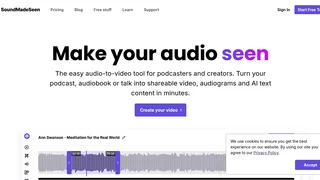
SoundMadeSeen is an audio-to-video platform designed for podcasters, audiobook narrators, musicians, and content creators who want to transform their audio into engaging video content. The tool handles transcription, video generation, and AI-powered clip discovery so creators can produce shareable social media videos, audiograms, and written content from a single audio file without needing advanced video editing skills.
Key Features
- Audio-to-Video Creator: Convert audio files into branded videos using pre-built templates or a custom video designer. Users can add text overlays, images, video clips, and graphics with a beginner-friendly interface suited for non-designers.
- AI-Powered Transcription: Generate full transcriptions with timestamps and speaker identification in minutes. The transcription can then be edited, used as subtitles, or repurposed into show notes and blog text.
- Podcast Clip Finder: AI analysis identifies the most engaging topics and moments from your audio, helping you surface the strongest clips to promote across YouTube, Instagram, TikTok, and other platforms.
- AI Content Generation: Produce show notes, social media posts, and blog articles tailored to your audience using built-in AI writing tools. This reduces the time spent on complementary content creation after recording.
- Text-to-Speech with Voice Cloning: Generate multi-speaker AI voiceovers when you prefer not to use your own voice. Voice cloning lets you replicate your own voice for TTS scripts, and translations into different languages are supported.
- AI Image and Video Generation: Create visuals directly within the platform using built-in tools powered by the latest AI image and video models, eliminating the need for separate design software.
- Team Collaboration and API Access: Higher-tier plans support multiple team members, bulk file uploads, and API access for integrating SoundMadeSeen into automated content pipelines.
How It Works
Users upload an audio file such as a podcast episode, audiobook chapter, or recorded talk. The platform transcribes the audio with timestamps and speaker labels, then presents an editor where you can design a video layout, pick a template, or let the AI recommend the best clips. Once the video is styled with text, images, and graphics, it can be exported and shared directly to social media. Transcripts and AI-generated written content like show notes and blog drafts are produced alongside the video, so one upload yields multiple content assets.
Integrations
SoundMadeSeen offers API access on its Influencer and Business plans, enabling developers to integrate the audio-to-video and transcription pipeline into custom workflows. While direct platform integrations with social media schedulers or podcast hosting services are not explicitly listed, the video output formats are designed for YouTube, Instagram, TikTok, and other major social platforms. The affiliate program is managed through Tolt, which handles tracking, discount codes, and commission payouts via PayPal, Wise, wire transfer, or local bank transfer.
Use Cases
- Podcast Promotion: Turn full podcast episodes into short, eye-catching video clips complete with captions and waveforms for social media distribution.
- Audiobook Marketing: Narrators and authors can create visual teasers for book releases using excerpts from audiobook recordings.
- Educational Content: Educators and trainers can repurpose lectures and talks into video summaries with synchronized subtitles for learning platforms.
- Musician Content: Artists can pair their tracks with AI-generated visuals to create music video content for social channels.
Pricing and Plans
SoundMadeSeen offers a 14-day free trial across all plans. Annual billing saves up to 20%. The following monthly plans are available:
- Creative Plan: $9.95/month. Includes 120 minutes of video generation, 120 minutes of transcription, unlimited designs, no watermark or branding, 90 days of file storage, 500 AI image credits, 10,000 characters of text-to-speech, and 10,000 text content tokens.
- Influencer Plan: $14.95/month. Includes 300 minutes of video generation, unlimited transcription, 9 months of file storage, 1,000 AI image credits, 25,000 characters of text-to-speech, 20,000 text content tokens, up to 5 team members, bulk file uploads, one voice clone, and API access.
- Business Plan: $25.95/month. Includes 500 minutes of video generation, unlimited transcription, 12 months of file storage, 1,500 AI image credits, 40,000 characters of text-to-speech, 50,000 text content tokens, up to 7 team members, bulk file uploads, three voice clones, and API access.
- Pay-As-You-Go Plan: A starter package with the ability to top up credits as needed, suited for irregular or low-volume usage. Specific rates are available upon sign-up.
Pros and Cons
Pros:
- Simple, beginner-friendly video designer that requires no prior editing experience.
- AI-powered clip finder helps surface the best promotional moments automatically.
- Multiple output types from one upload (video, transcript, written content), reducing total content creation time.
- Affordable entry point at $9.95/month with no watermark on any paid plan.
- Voice cloning and multi-language TTS expand content reach without additional recording.
- Transparent affiliate program with 20% recurring commission for up to 12 months.
Cons:
- No free tier beyond the 14-day trial; ongoing use requires a paid subscription.
- Image and text-to-speech credits are capped per plan and do not roll over each month.
- Limited direct integrations with third-party podcast hosting or scheduling platforms at this time.
- Pay-As-You-Go pricing details are not fully disclosed publicly before sign-up.
Who Should Use SoundMadeSeen
SoundMadeSeen is a strong fit for podcasters and audio-first creators who need an all-in-one tool to repurpose their recordings into video and written content without hiring a video editor. Audiobook narrators, educators, and musicians who want to grow their social media presence through short-form video will also benefit. Teams managing multiple shows can take advantage of the Influencer and Business plans for collaborative workflows. It may be less suitable for users who rely heavily on native integrations with existing podcast hosting platforms, or those who need a fully free solution beyond the trial period.