ChatGPT Assistant - Use AI Everywhere is an open-source Chrome extension that integrates ChatGPT into daily browsing tasks. Created by developer Matt Frisbie and available on the Chrome Web Store with over 10,000 users, it brings ChatGPT functionality to search engines, email platforms, and any website through a popup interface, browser omnibar, and right-click context menu.
Key Features
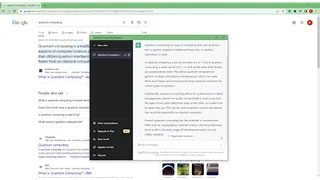
- Search engine companion: ChatGPT responses appear alongside traditional results on Google, Bing, DuckDuckGo, and Brave. Users see AI-generated answers in the same view without opening a separate ChatGPT tab, enabling quick cross-referencing of search and AI results.
- Popup interface: A toolbar button opens ChatGPT as a popup overlay on any website. The keyboard shortcut Ctrl+Shift+K provides instant activation. A dedicated standalone page is available for longer sessions requiring more screen space.
- Right-click prompts: Selected text on any webpage can be sent to ChatGPT as a prompt via the right-click context menu. This enables instant summarization, explanation, rewriting, or translation without manual copying and pasting between tabs.
- Browser omnibar integration: Typing gpt followed by a space in the address bar sends prompts to ChatGPT directly from the omnibox, offering the fastest access for keyboard-driven users.
- Email writing assistance: Inside Gmail and other webmail interfaces ChatGPT can draft replies, adjust tone, proofread text, or improve wording without leaving the composition window.
- Prompt history: Previously submitted prompts are saved and can be reused. This helps with repeating common queries, maintaining consistent workflows, or iterating on previous responses.
- Code syntax highlighting: ChatGPT responses containing code blocks are rendered with proper syntax highlighting, improving readability for developers who use the extension for technical queries and code generation.
How It Works
After installation a ChatGPT icon appears in the browser toolbar. Clicking it or pressing Ctrl+Shift+K opens a popup connected to the ChatGPT API. On supported search engines the extension injects ChatGPT responses alongside regular results. A settings panel lets users configure prompt behavior, adjust display preferences, and manage their prompt history.
Use Cases
- Quick research: Google or Bing searches display both traditional results and ChatGPT answers in one view, saving time and providing multiple perspectives on the same query without switching between tabs.
- Content analysis: Any selected webpage text can be sent to ChatGPT for summarization, translation, explanation, or rewriting through the context menu, useful for understanding long articles, complex topics, or foreign language content.
- Writing and editing: The email composition feature and general prompt interface help with drafting new content, editing existing text, refining tone, proofreading, and improving grammar across emails, documents, and web forms.
Privacy and Security
The extension sends selected text and user prompts to the ChatGPT API for processing according to the OpenAI privacy policy. The extension is open source under the MIT license with source code available on GitHub for independent review. The developer declares in the Chrome Web Store that no user data is sold to third parties, used for unrelated purposes, or used for creditworthiness or lending decisions. The extension only transmits data necessary to send prompts and display ChatGPT responses in the browser.