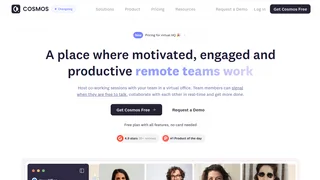
Cosmos Video is a virtual office platform designed for remote teams that want a persistent online space to collaborate and communicate throughout the workday. Unlike standard video conferencing tools that rely on scheduled meetings and call links, Cosmos Video offers an always-on virtual workspace where team members can see who is available, drop into spontaneous conversations via spatial audio, and work side by side in shared co-working rooms. The platform supports up to 200 participants per call and includes 12 built-in team building games, AI-powered recording and transcription through Cosmos Replay, and integrations with Miro, Figma, Google Docs, Slack, and Spotify.
Cosmos Video is developed by COSMOS Video Limited, a UK-based company with SOC 2 compliance and GDPR adherence, hosting over 1 million hours of HD calls monthly.
Key Features
- Persistent Virtual Office with Spatial Video: Create a permanent digital workspace with custom floor plans and an interactive office map. Proximity-based audio means you hear only people near your avatar, simulating a physical office environment.
- Multiple Room Types for Different Work Modes: Personal rooms support ad-hoc calls with no scheduling. Meeting rooms handle formal video calls with up to 200 participants and breakout rooms. Focus rooms enable silent co-working sessions with cameras on for visual accountability.
- 12 Built-in Team Building Games: Game rooms launch automatically when people enter, offering titles like Two Truths and a Lie, Cosmos Trivia, Chess, Jigsaw Puzzle, Navy Wars, and Sudoku. These serve as icebreakers and casual bonding activities without leaving the platform.
- AI Recording and Transcription (Cosmos Replay): Record calls with AI-generated transcriptions and summaries. Recording storage ranges from 5 hours on the Free plan to 3 hours per user on Premium, with unlimited retention on paid tiers.
- Team Chat with Channels and Direct Messages: Persistent chat organized by public or private channels, plus one-to-one DMs with threaded conversations, reactions, and file uploads ranging from 25 MB to 500 MB depending on plan.
- True Statuses and Availability Signals: Team members set real availability states including Available, Listening, Focusing, and Away, helping remote colleagues know when someone is open to a quick conversation.
Pricing and Plans
Cosmos Video offers three pricing tiers. The Free plan costs $0 per month with up to 4 concurrent online users, SD video quality, 5 hours of total recording storage with 15-day retention, and a library of 50-plus pre-made floor plans. No credit card is required.
The Premium plan is priced at $7.70 per user per month billed annually with a 16 percent savings over monthly billing. It supports up to 150 concurrent users, HD 1080p video, 4K screen sharing at 30 frames per second, 3 hours of recording storage per user with unlimited retention, custom floor plans, and 24-hour human support. An annual space and call capacity fee of $924 applies.
The Enterprise plan is available via custom quote for teams of 200-plus people or education providers. It supports up to 500 concurrent users and includes SSO, custom URL, dedicated video servers, uptime SLA, VIP onboarding, and a 6-hour support response time. A 14-day free trial with a credit card is available on all paid plans. Education institutions, nonprofits, and startups can request an additional 10 percent discount on annual billing.
Virtual Office and Spatial Video
The core differentiator of Cosmos Video is its spatial video environment. Instead of a grid of faces, team members navigate an interactive floor plan with avatars. Walking near a colleague opens an audio channel, and moving away closes it, mimicking the organic flow of an in-person office. Floor plans are fully customizable on paid plans with a library of 50-plus pre-built layouts available to all users, and the always-on space persists between sessions so team members can drop in at any time without waiting for a host.
Team Building and Engagement
Cosmos Video includes 12 multiplayer games accessible directly inside game rooms with no external installs required. Games span team bonding icebreakers like Two Truths and a Lie, group play activities like Cosmos Trivia and Jigsaw Puzzle, and friendly duels including Chess, Navy Wars, and Tic Tac Toe, helping distributed teams build rapport without leaving their primary collaboration platform.
Pros and Cons
Pros:
- Persistent virtual office with spatial audio reduces reliance on scheduled meetings and supports spontaneous collaboration.
- Generous Free plan with no credit card required, including access to floor plans, chat, and basic calling.
- 12 built-in games provide a lightweight way for remote teams to socialize without switching to external apps.
- AI transcription and recording summaries are included on all plans, including Free.
- SOC 2 certified with AES-256 encryption, making it suitable for organizations with security compliance requirements.
Cons:
- The Free plan is limited to 4 concurrent users, which is too restrictive for most teams beyond a very small pilot group.
- Premium pricing at $7.70 per user per month plus a $924 annual capacity fee makes cost scaling unpredictable for mid-size teams.
- No affiliate or partner program exists, so content creators and consultants cannot earn referral commissions.
- Mobile access is available but the spatial video experience is primarily designed for desktop, limiting on-the-go usability.
Who Should Use Cosmos Video
Cosmos Video is best suited for remote-first or hybrid teams of 10 to 150 people that value spontaneous collaboration and want to reduce meeting overhead. Small startups can start on the Free plan, while mid-size companies that can absorb the per-user cost will find the Premium tier delivers a full-featured virtual headquarters.
The platform is less ideal for teams of 2 to 3 people who may not need a persistent virtual space, or for large enterprises whose compliance requirements exceed the current Enterprise feature set. Organizations seeking a simple video conferencing replacement rather than a virtual office culture shift may find the spatial interface adds unnecessary complexity to basic meeting workflows.