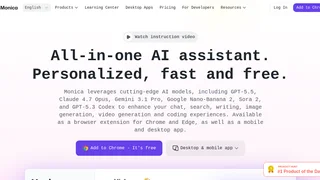
Monica là một trợ lý trí tuệ nhân tạo tất-cả-trong-một được thiết kế để tối ưu hóa quy trình làm việc chuyên nghiệp và sáng tạo trực tiếp trên trình duyệt, máy tính hoặc các thiết bị di động. Hoạt động dưới dạng tiện ích mở rộng trình duyệt (extension), ứng dụng máy tính và ứng dụng di động, Monica tích hợp nhiều mô hình AI hàng đầu hiện nay như GPT-5.5, Claude 4.7 Opus, Gemini 3.1 Pro và Sora 2 vào một giao diện thanh bên (sidebar) thống nhất. Thiết kế tập trung này giúp người dùng không cần phải duy trì nhiều tài khoản đăng ký khác nhau hay chuyển đổi liên tục giữa các tab. Bằng cách cung cấp quyền truy cập tức thì vào công cụ trò chuyện, viết lách, tìm kiếm web, dịch thuật thời gian thực và chỉnh sửa hình ảnh, Monica đóng vai trò như một trợ lý lập trình và nghiên cứu toàn diện giúp nâng cao hiệu suất làm việc hàng ngày của người viết lách, nhà nghiên cứu, lập trình viên và nhà sáng lập doanh nghiệp.
Các tính năng chính
- Trò chuyện AI đa mô hình: Cho phép người dùng hội thoại với các mô hình AI hàng đầu từ một giao diện duy nhất và đối chiếu kết quả song song để tìm ra câu trả lời phù hợp nhất cho công việc của mình mà không bị mất ngữ cảnh hội thoại.
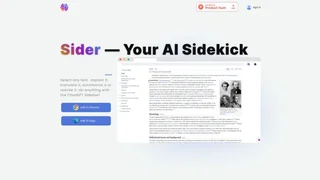
- Thanh bên trình duyệt thông minh: Tích hợp thanh bên tiện lợi cho các trình duyệt Google Chrome, Microsoft Edge và Safari, cung cấp khả năng truy cập nhanh bằng một cú nhấp chuột, các tác vụ thông minh trên thanh công cụ và hỗ trợ viết lách theo ngữ cảnh trên bất kỳ trang web nào.
- Tóm tắt tài liệu và video: Tóm tắt các bài viết dài, báo cáo PDF và video YouTube thành các dàn ý cấu trúc, ý chính và các mốc thời gian nổi bật, giúp người dùng nắm bắt nội dung dài chỉ trong vài giây.
- Soạn thảo văn bản và biểu mẫu: Cung cấp thư viện gồm hơn 80 biểu mẫu viết lách được thiết kế sẵn để hỗ trợ người dùng soạn thảo email, bài đăng mạng xã hội, viết báo cáo và tối ưu hóa nội dung marketing.
- Tìm kiếm web tích hợp AI: Thực hiện tìm kiếm thông tin thời gian thực trên internet để trả lời các câu hỏi với dữ liệu mới nhất, hiển thị nguồn trích dẫn rõ ràng ngay bên cạnh kết quả tìm kiếm thông thường.
- Công cụ đa phương tiện sáng tạo: Tích hợp sẵn các công cụ tạo ảnh bằng AI, chỉnh sửa ảnh, xóa đóng dấu (watermark), trò chuyện với tài liệu qua ChatPDF, trích xuất văn bản OCR và tự động vẽ sơ đồ tư duy.
- Tích hợp cho lập trình viên: Kết nối trực tiếp với các môi trường phát triển phổ biến thông qua tiện ích Monica Code cho VS Code và JetBrains, cung cấp gợi ý mã nguồn, hướng dẫn sửa lỗi và giải thích thuật toán trực quan.
Cách thức hoạt động
Monica hoạt động bằng cách điều hướng các câu hỏi của người dùng qua một cổng kết nối API đám mây liên kết với các mô hình AI khác nhau. Khi người dùng bôi đen văn bản trên trang web hoặc nhập yêu cầu vào thanh bên, tiện ích mở rộng sẽ thu thập ngữ cảnh và gửi đến máy chủ của Monica. Nền tảng sẽ tự động điều phối, phân tích mục đích của người dùng và áp dụng mô hình AI phù hợp nhất dựa trên tính khả dụng và gói tài khoản. Để duy trì trải nghiệm mượt mà, Monica lưu trữ lịch sử trò chuyện trong bộ nhớ đệm, kiểm soát giới hạn tần suất gọi API và áp dụng hệ thống tiêu thụ theo tín dụng (Advanced Credits) – trong đó các mô hình lập luận phức tạp sẽ tiêu tốn nhiều tín dụng hơn các mô hình cơ bản thông thường.
Bảng giá và các gói dịch vụ
Monica áp dụng mô hình Freemium, cung cấp gói dịch vụ miễn phí giới hạn lượt truy cập hàng ngày cùng các gói đăng ký trả phí để mở khóa các mô hình nâng cao và tăng hạn mức tín dụng.
| Gói dịch vụ | Bảng giá | Các tính năng chính |
|---|
| Miễn phí | $0 | Truy cập các mô hình trò chuyện cơ bản, giới hạn số lượt dùng hàng ngày, hỗ trợ dịch thuật và tóm tắt web cơ bản. |
| Pro | $9.90/tháng | Sử dụng các mô hình nâng cao (GPT và Claude), giới hạn lượt dùng hàng ngày cao hơn, đầy đủ biểu mẫu viết lách và nhận hạn mức tín dụng hàng tháng. |
| Max / Ultra | Phân cấp dịch vụ | Không giới hạn lượt truy cập cơ bản, nhận lượng lớn tín dụng Advanced Credits để tạo ảnh, chạy tác tử AI và hỗ trợ ưu tiên. |
Các tính năng nâng cao như tạo ảnh chất lượng cao và vận hành tác tử AI tự chủ sẽ tiêu hao tín dụng Advanced Credits. Người dùng gói miễn phí có thể mua thêm các gói tín dụng lẻ nếu sử dụng hết hạn mức hàng ngày mà không cần nâng cấp toàn bộ gói dịch vụ.
Ưu điểm và nhược điểm
Ưu điểm:
- Tích hợp quyền truy cập vào nhiều mô hình AI hàng đầu thế giới chỉ trong một tài khoản duy nhất.
- Khả năng tích hợp sâu vào trình duyệt giúp thu thập ngữ cảnh trang và thực hiện tác vụ nội dòng tiện lợi.
- Đồng bộ hóa thư viện tài liệu và lịch sử trò chuyện mượt mà giữa các nền tảng trình duyệt, máy tính và di động.
- Tăng tốc độ nghiên cứu thông tin nhờ tính năng tóm tắt video và tệp tin PDF tự động.
Nhược điểm:
- Hạn mức sử dụng của gói miễn phí khá hạn chế đối với nhu cầu công việc hàng ngày của người dùng chuyên nghiệp.
- Số lượng tính năng và cài đặt phong phú có thể gây bối rối cho người dùng mới bắt đầu.
- Quyền truy cập các mô hình cao cấp nhất bị giới hạn ở các gói đăng ký trả phí hàng tháng.
Ai nên sử dụng Monica
Monica phù hợp nhất cho nhân viên văn phòng, nhà sáng tạo nội dung, nhà nghiên cứu và lập trình viên làm việc chủ yếu trên trình duyệt web và cần sự trợ giúp thường trực của AI. Công cụ này cực kỳ hữu ích cho các chuyên nghiệp cần tóm tắt lượng lớn tài liệu, viết báo cáo đa ngôn ngữ hoặc thường xuyên đối chiếu kết quả giữa các mô hình AI khác nhau. Trong khi người dùng thông thường có thể hài lòng với gói miễn phí cho các tra cứu nhanh, những người dùng chuyên nghiệp sử dụng hàng ngày sẽ cần nâng cấp lên các gói trả phí để duy trì hiệu suất công việc không bị gián đoạn.