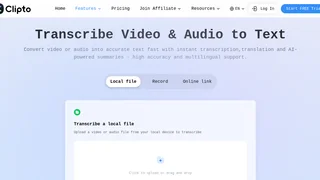
Clipto is an AI-powered transcription platform that converts audio and video recordings into accurate, searchable text. Designed for professionals, content creators, educators, and teams, Clipto combines automatic speech recognition with speaker identification, timestamps, and multilingual translation to turn spoken content into ready-to-use documentation, notes, and summaries quickly and reliably.
How It Works
Upload an audio or video file directly, or paste a link to an online recording from platforms like YouTube or Vimeo. Clipto's AI engine processes the file using advanced speech recognition models and generates a timestamped transcript with automatic speaker labels. Users can review and edit the transcript in the browser, then export it in the format that fits their workflow. The platform also provides one-click AI summaries that extract key points, decisions, and action items from lengthy recordings, reducing hours of review to minutes of reading.
Key Features
- Audio and video transcription with support for files up to 6 hours in length
- Automatic speaker identification that distinguishes and labels different voices throughout the transcript
- Timestamped output for precise referencing, video subtitle creation, and content navigation
- AI-powered summaries that extract key points, action items, and decisions from recordings
- Support for 99+ languages with built-in translation capabilities for multilingual teams
- Export to multiple formats including TXT, DOCX, PDF, SRT, VTT, and XML
- Access to advanced AI models for higher accuracy on complex or noisy audio
- Unlimited video and audio search across all transcribed content
Use Cases
- Journalists and researchers transcribing interviews and field recordings for articles and reports
- Content creators generating subtitles, captions, and show notes for video platforms and podcasts
- Business teams documenting meeting discussions, tracking action items, and sharing notes across departments
- Students and academics converting lecture recordings and research interviews into searchable study materials
- Podcasters creating searchable episode archives and written content from audio episodes
- Legal and medical professionals maintaining accurate written records of consultations and proceedings
- Marketing teams repurposing webinar and event recordings into blog posts and social media content
Pricing
Clipto offers a 7-day free trial with two subscription options available after the trial period ends.
| Plan | Price | Key Features |
|---|
| Yearly | $8.99/month | Unlimited video and audio search, automatic transcription, speaker tagging, 99+ languages, files up to 6 hours, advanced models |
| Monthly | $9.99 first month, then $24.99/month | Same features as Yearly plan with monthly billing flexibility |
The yearly plan is billed at $107.88 annually. Both subscription tiers include the same feature set; the yearly plan offers significant savings over the standard monthly rate after the first discounted month.
Export and Integration
Clipto supports direct URL imports from platforms like YouTube and Vimeo, eliminating the need to download and re-upload files. The multiple export formats ensure compatibility with document editors, video editing software, and content management systems. The SRT and VTT subtitle formats are especially useful for video captioning workflows, while DOCX and PDF exports suit documentation and sharing needs. The built-in translation feature allows teams to export transcripts in different languages, supporting global collaboration without additional translation tools.
Accuracy and Language Support
With support for over 99 languages, Clipto serves multilingual teams, global organizations, and international audiences. The platform uses advanced AI models trained on diverse audio conditions to maintain accuracy across accents, background noise, and varying recording quality. This training data includes noisy environments, overlapping speech, and different microphone setups, helping the transcription engine produce reliable results even with less-than-ideal source material. Speaker identification works across multiple participants, making it suitable for panel discussions, multi-person interviews, and team meetings where attributing statements to the right person is essential for creating actionable and reliable meeting notes.