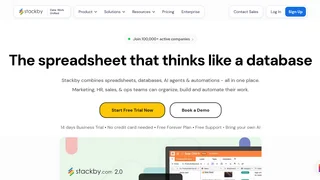
Stackby is a no-code spreadsheet-database platform that combines the familiarity of spreadsheets with the power of relational databases, AI agents, and workflow automations. Designed for marketing, sales, HR, operations, and project teams, Stackby replaces the need for multiple tools by centralizing data, collaboration, and automation in one workspace. Over 100,000 organizations across 150 countries use Stackby to build custom workflows without coding or technical training.
Key Features
- 30+ Column Types: Beyond standard text and number fields, Stackby offers link-across-tables (relational joins), formulas, AI-generated fields powered by OpenAI, Gemini, or Anthropic, checklists, file attachments, ratings, and API-connected columns that pull live data from external services.
- 8 Data Views: Visualize the same dataset in Grid, Kanban, Gallery, Calendar, Timeline, List, Form, and Updatable Form layouts. Group records within views and apply filters to create saved perspectives for specific team roles.
- AI Field Agents and Co-Builder: Bring your own API key to connect AI models directly into spreadsheet columns for content generation, document analysis, or web research. The AI Co-Builder creates fully structured databases and workflows from natural language prompts.
- Advanced Form Builder: Build forms with 30+ field types, conditional logic, multi-line-item support, updatable forms, password protection, custom branding, and display elements for collecting and updating data from external stakeholders.
- Reporting Dashboards and Apps: The Apps Marketplace provides charts, pivot tables, summary boxes, goal trackers, time trackers, embeds, and a page designer to create real-time dashboards on top of any Stackby database.
- Internal and External Automations: Set up triggers and actions to send email and Slack notifications, update rows, or generate AI content automatically. Connect Stackby to 2,000+ external apps via Zapier, Make, Pabbly Connect, and n8n.
- Granular Permissions: Control access at the stack, table, view, and column level. Personal and locked views let users keep their workspace configurations private while sharing underlying data.
How Stackby Works
Stackby organizes data into stacks, each containing one or more tables with rows and columns. Unlike traditional spreadsheets, columns can be linked across tables to create relational databases, and column types like API connectors fetch live data from services such as Google Analytics, YouTube, Facebook Ads, and Mailchimp without writing code. Users can import existing data from CSV, Excel, or Google Sheets, or generate a database from a prompt using the AI Co-Builder. Once a stack is configured, teams collaborate in real time with @mentions, checklists, reminders, notifications to Slack and Microsoft Teams, and view-level sharing.
Pricing and Plans
Stackby offers a Free plan with 5 editors, 20 stacks, 1,500 rows per stack, and 2 GB of attachment storage. Paid annual plans, billed per seat, start with Economy at $4.20 per user per month ($149 per year for 3 users), which includes 25 stacks, 7,000 rows per stack, 6 GB of storage, and 1,000 internal automation runs per month. The Business plan costs $8.30 per user per month ($299 per year for 3 users) with 50 stacks, 50,000 rows per stack, 20 GB of storage, and 25,000 automation runs. The Pro plan at $12.50 per user per month ($449 per year for 3 users) offers 100 stacks, 100,000 rows per stack, 50 GB of storage, and 100,000 automation runs. An Enterprise tier with custom pricing includes unlimited stacks, SAML-based SSO, audit logs, and an enterprise admin panel. A 14-day free trial of the Business or Pro plan is available without a credit card.
Integrations and Automations
Stackby natively integrates with over 40 APIs, allowing columns to pull live data from Google Analytics, Google Search Console, YouTube Analytics, Facebook Ads, Mailchimp, SerpStat, Hunter.io, Clearbit, Twilio, and more. For broader workflow automation, Stackby connects to Zapier, Make, Pabbly Connect, and n8n.io, extending its reach to thousands of external tools. A developer API in beta provides programmatic access for custom integrations. The internal automation engine supports email notifications, Slack and Microsoft Teams alerts, row updates, and AI content generation triggered by record changes or scheduled intervals.
Pros and Cons
Pros:
- Familiar spreadsheet interface with relational database power lowers the learning curve for non-technical teams.
- Annual pricing is substantially cheaper than comparable platforms, with annual plans discounted over 50 percent versus monthly billing.
- AI Field Agents support multiple model providers (OpenAI, Gemini, Anthropic) using your own API keys, giving users control over AI costs and model choice.
- Granular view-level, table-level, and column-level permissions provide fine-grained access control uncommon in spreadsheet-style tools.
- 8 view types plus dashboards and forms support diverse workflows from project tracking to CRM to content operations within a single platform.
Cons:
- The Free plan is limited to 1,500 rows per stack and 2 GB of attachment storage, which is insufficient for teams managing substantial datasets.
- API column-linked integrations are capped per workspace, ranging from 2 connections on the Free plan to 25 on Enterprise, restricting concurrent live data sources.
- Two-way syncing between stacks is listed as coming soon and is not yet available, limiting cross-workflow data consistency.
Who Should Use Stackby
Stackby suits teams that need more structure than a spreadsheet but find traditional databases or project management tools too rigid. Marketing agencies, operations teams, sales departments, and project managers who want to centralize workflows, automate data entry, and build custom dashboards without coding will find it a practical fit. Small to mid-sized teams on a budget benefit from the aggressive annual discounting compared to Airtable or Monday.com. Teams that require advanced two-way data syncing or very large row limits on a free plan may need to evaluate the paid tiers carefully or consider alternative platforms.